

Break work into subtasks and milestones
Big work is easier to watch when it is split. A task can carry child tasks, and any task that has been executed carries a timeline of what actually happened.
The Subtasks tab
Section titled “The Subtasks tab”Every child of a task is listed on its Subtasks tab, with the count on the tab itself. Each row gives the child’s title, its status, who holds it, and when it is due, and links to the child’s own workspace.
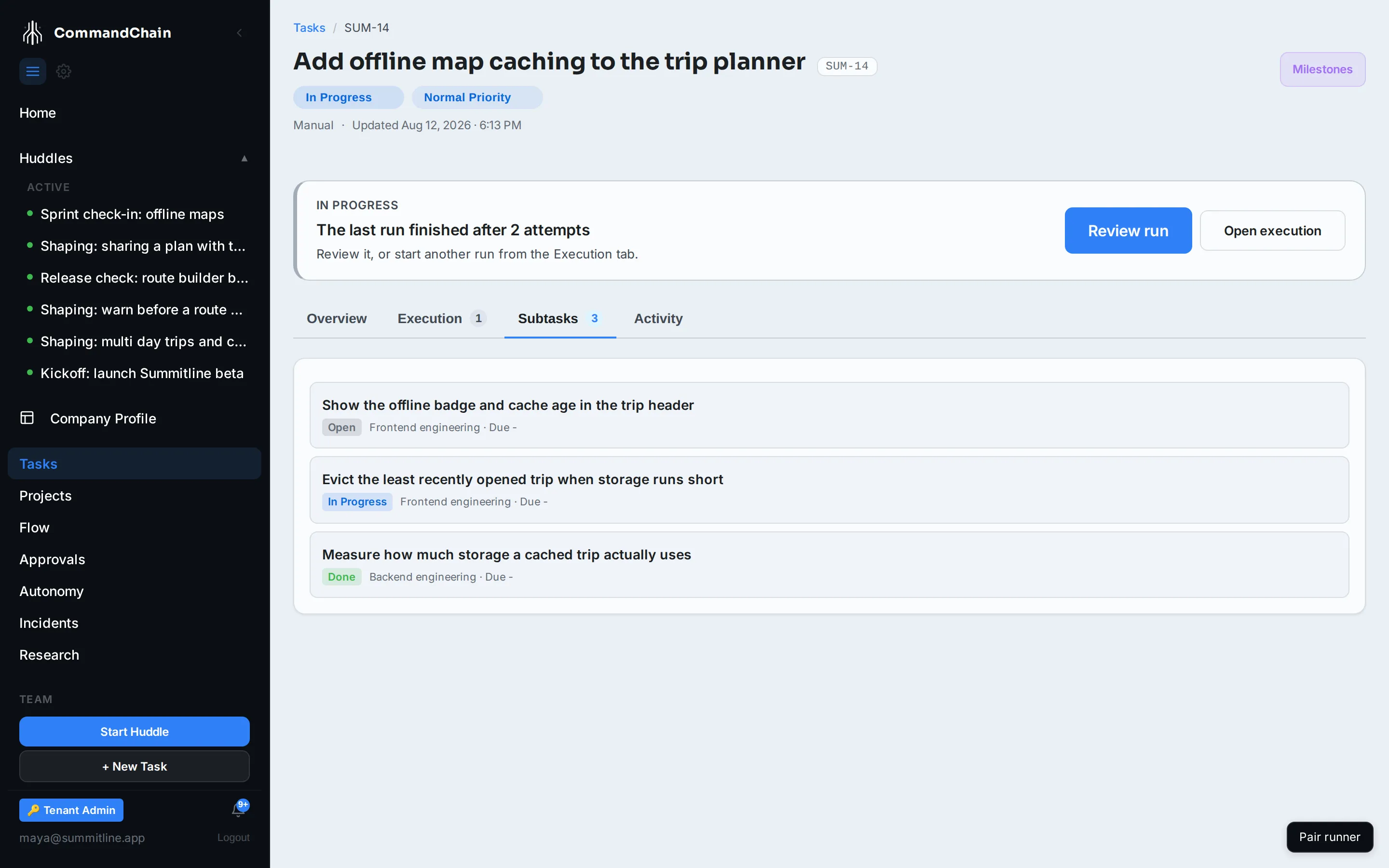
A child is an ordinary task. It has its own key, its own runs, and its own history, and it appears in the task list alongside everything else. The parent link shows up in the child’s Details sidebar as Parent Task.
Where subtasks come from
Section titled “Where subtasks come from”- A specialized task reaching its next stage. A content task entering verification spawns the verification child, entering human review spawns the approval, and so on. That is how the pipeline is built.
- A run needing permission. When a run has to be approved before it starts, the approval it raises is created as a child of the task, so the decision is attached to the work rather than floating loose.
- Anything that creates a task with a parent, including work merged from a huddle where one item is plainly part of another.
The milestone timeline
Section titled “The milestone timeline”Milestones in the task header opens the execution timeline of the task’s most recent run: every attempt it has made, newest first. The count on the button is the number of attempts the task has taken across all of its runs.
Each attempt reads as two entries: when it started and which phase it entered, then how it ended. A failed attempt carries its error; a completed one carries the summary the runner reported. Open latest run goes to the run itself, where the attempts, their events, and their artifacts are laid out in full.
A task that has not been executed says so rather than showing an error. The list of runs, their outcomes, and any gate waiting on a decision live on the Execution tab.
Which one to use
Section titled “Which one to use”| Question | Where to look |
|---|---|
| Is this work split into pieces, and where is each? | Subtasks tab |
| What has the latest run attempted, in order? | Milestones |
| How many runs has this taken, and how did each end? | Execution tab |
Next steps
Section titled “Next steps”- Work in the Task Workspace: the tabs around these two views.
- Runs and attempts: the execution model behind the timeline.
- Budgets: the caps the timeline reports against.