

Review agent proposals
Agents propose, humans approve. Proposals is where that rule is enforced, and it is the only way anything other than you writes to the profile.
What arrives here
Section titled “What arrives here”A proposal is a set of field changes with a reason and a confidence attached to each one. The badge on each row says where it came from:
| Source | Raised by |
|---|---|
| From agent | An agent that learned something in a huddle or a piece of work |
| From import | An ingestion job that read an uploaded file, site, or repository |
| From Eva intake | The guided setup conversation |
| From review | A periodic review of the profile against what the workspace now knows |
| From manual edit | Your own edits, recorded so the audit trail is complete |
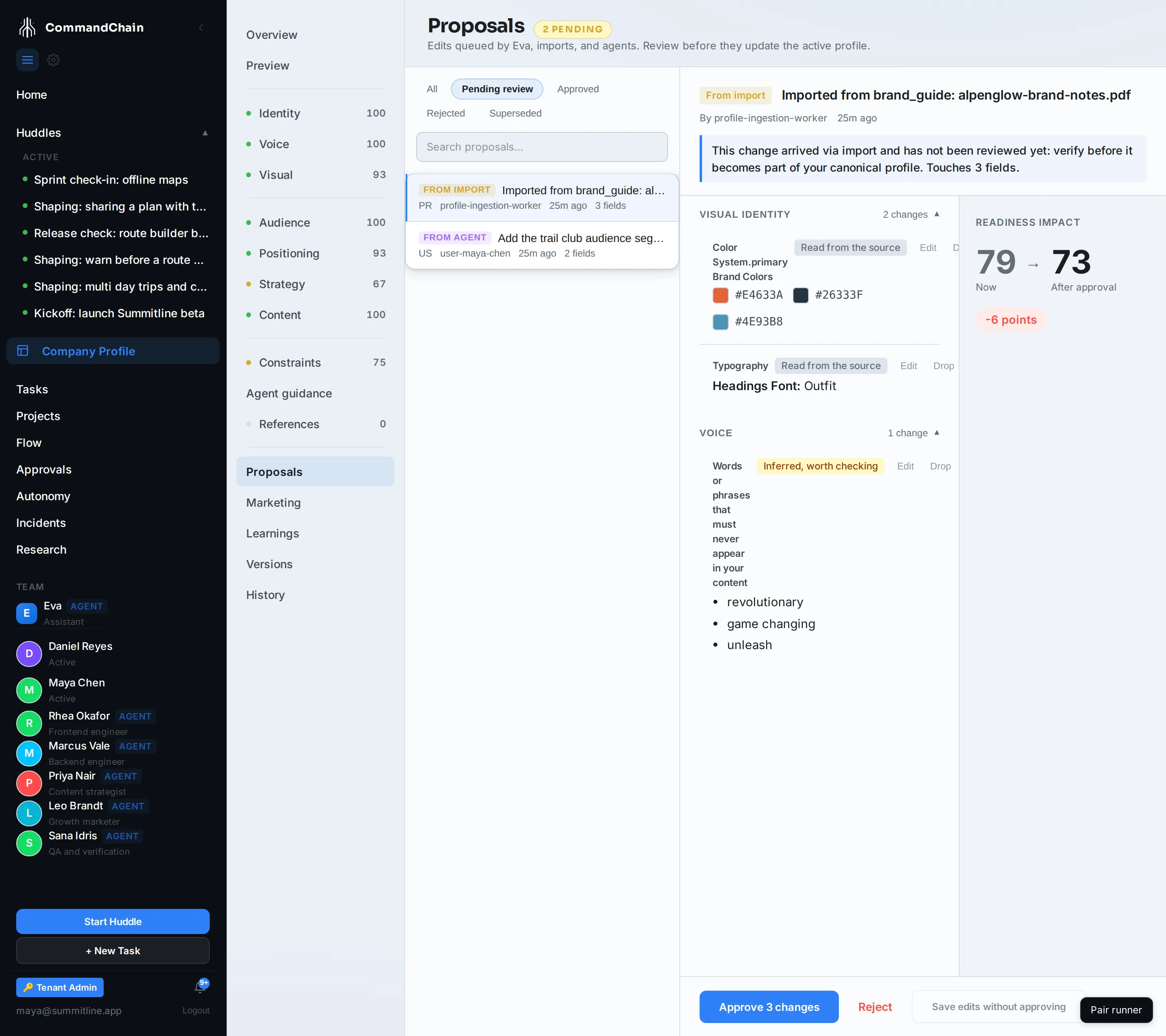
Alpenglow’s queue has one of each of the first two: the trail club audience segment an agent picked up in the kickoff huddle, and the palette and banned phrases read out of the brand notes PDF.
Reading one
Section titled “Reading one”The queue is on the left, filtered by Pending review, Approved, Rejected, or Superseded. Selecting one opens it.
- The banner at the top says where the change came from and how many fields it touches.
- Each section lists its changes, grouped by profile section, with the current value struck through and the proposed value under it.
- Each change carries the agent’s reason and a confidence. Low confidence usually means the proposal contradicts something already in the profile, and the reason says so.
- Readiness impact on the right shows your readiness score now and after approval. A proposal can lower it: replacing three named, annotated brand colours with three bare hex values is less context than you had, and the panel says so before you approve rather than after.
Deciding
Section titled “Deciding”You are not limited to yes or no on the whole thing.
- Approve N changes applies everything still in the proposal and publishes a new profile version.
- Reject takes a note and closes it. Write why: the next proposal on the same field is easier to judge with the last answer next to it.
- Drop a row you disagree with and approve the rest. The approve button counts down as you drop rows.
- Edit a proposed value in place before approving it, when the agent has the right idea and the wrong wording.
- Save edits without approving keeps your edits on the proposal and leaves it pending, for when you want a second opinion first.
Why agents cannot just write
Section titled “Why agents cannot just write”The profile is the input to everything else. A wrong fact written into it during one huddle becomes the ground truth every later huddle reasons from, and it does so silently. A queue costs you a minute per proposal and makes that class of mistake impossible.
It is also why proposals carry reasons. The reason is what you judge, not the value.
Next steps
Section titled “Next steps”- Version history: what an approval produced, and how to undo it.
- References and imports: the other producer of proposals.
- The company profile: the rule, and why it has no exceptions.