

Generate a deck
A deck starts as a sentence in a huddle. An agent decides a deck is the right answer, plans it, and the platform renders it into a presentation that lands in the huddle’s artifacts.
Ask for one
Section titled “Ask for one”-
Open a huddle that has an agent in it, and say what the deck is for and roughly how long it should be.
-
Name the artifact. “Write up where we are” gets you prose; “put it on the workspace as a short deck” gets you a deck, because it tells the agent which tool to reach for.
-
Watch the artifact strip above the conversation. A new chip appears as soon as the deck exists, before any slide has rendered.
Alpenglow’s went in like this:
Rhea, what does the go/no-go case for the beta look like from where you sit? Put it on the workspace as a short deck we can walk the room through: where caching stands, the three hard blockers, and the call you would make. Three or four slides, nothing fancy.
The stages
Section titled “The stages”Open the chip to watch it. The header carries the deck’s status, and it moves through the pipeline in one direction:
| Status | What is happening |
|---|---|
| Planning | An agent is deciding the slides: what each one says, what shape it takes, and what evidence it rests on |
| Rendering or Queued for rendering | The plan has become a slide specification and the renderer is turning it into files |
| Ready | Every requested output rendered |
| Partial | The preview rendered and at least one other output did not |
| Failed | Nothing rendered. The pane names the error and offers Retry Render |
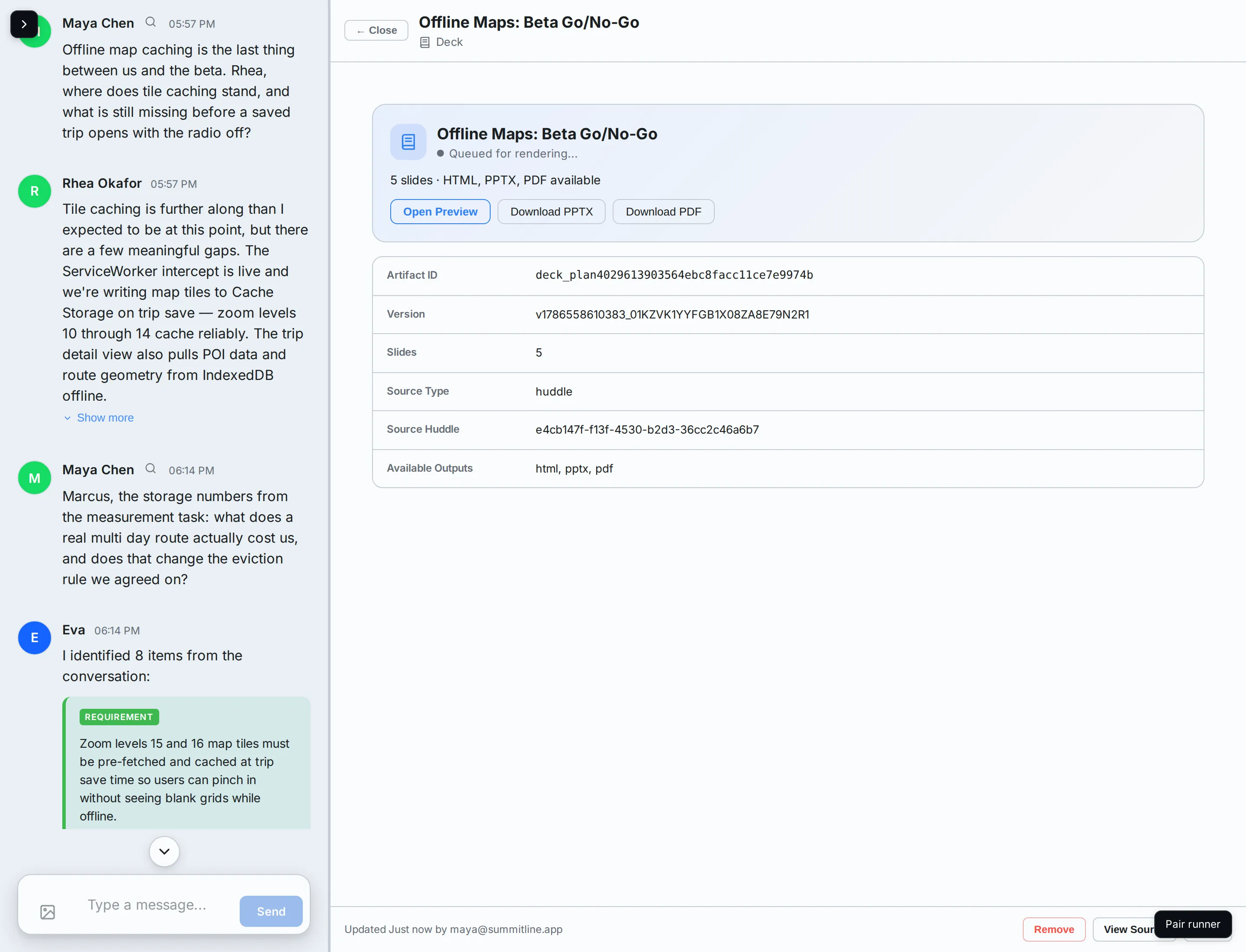
The pane refreshes itself while a deck is in flight, so there is nothing to reload.
What you get
Section titled “What you get”A finished deck carries its slide count, its available outputs, and the buttons for each:
- Open Preview shows the rendered deck inline, one slide at a time, with the speaker notes underneath.
- Download PPTX and Download PDF give you the file.
- View Render Report is the record of what the renderer did, including any warning it raised.
The metadata table underneath names the artifact, the version rendered, the slide count, and the huddle the deck came from.
Asking for a different deck
Section titled “Asking for a different deck”A deck is a snapshot of what was known when it was planned. To change what it says, ask again in the huddle rather than editing slides: the new ask produces a new deck, and the old one stays in the artifact strip where it was.
Next steps
Section titled “Next steps”- How a deck picks up your brand: where the colours and type come from.
- Export formats: HTML, PPTX, and PDF, and when each is produced.
- Work with a huddle’s artifacts: the rest of what a huddle can produce.