

Create a role
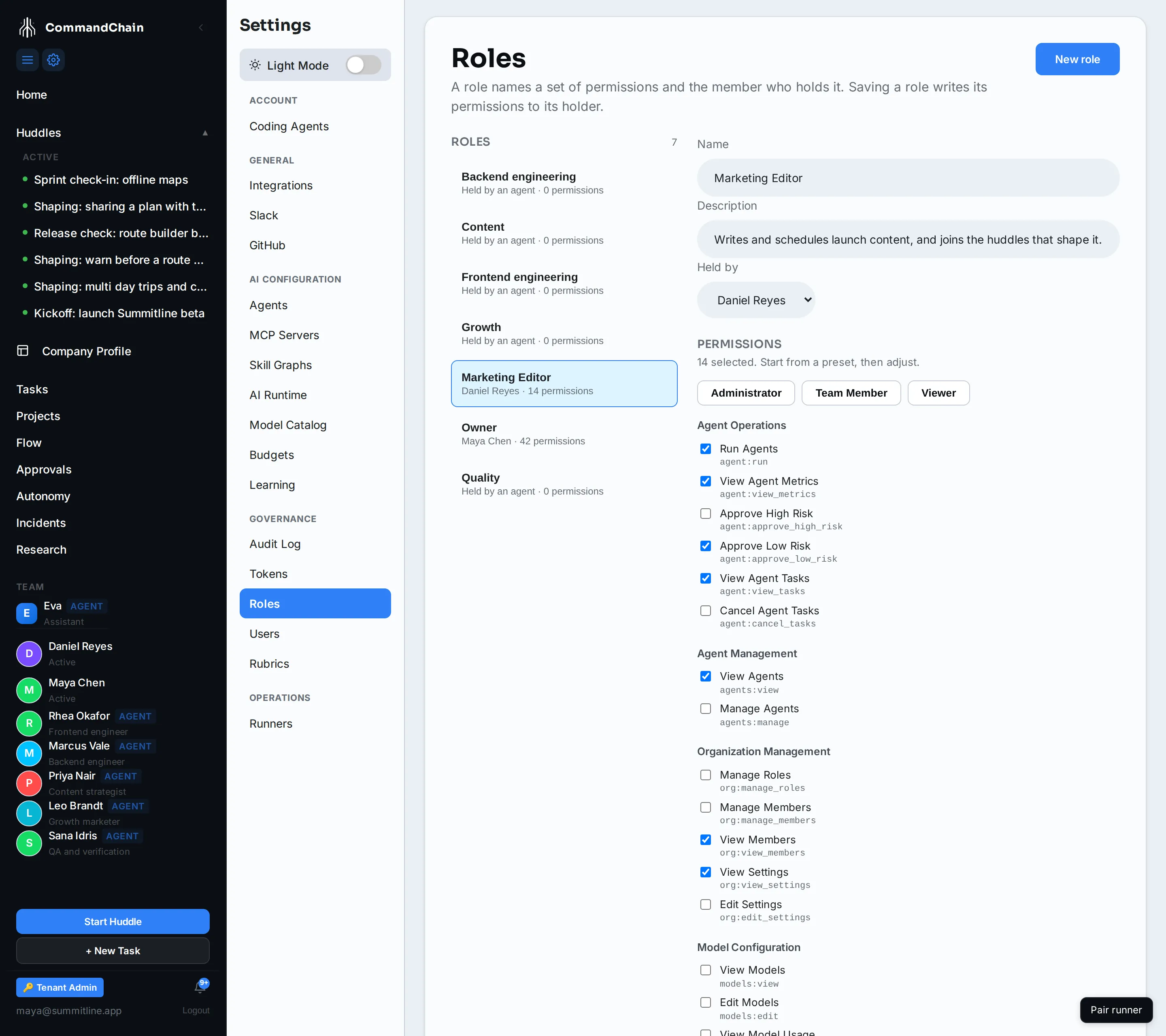
A role is one record with three parts: a name, the set of permissions it stands for, and the member or agent who holds it. Settings → Governance → Roles is where all three are edited. It needs the manage_org_roles permission.
Create the role
Section titled “Create the role”- Click New role.
- Give it a name a colleague would recognise. “Marketing Editor” beats “Role 2”.
- Pick a preset as a starting point (Administrator, Team Member, Viewer), then tick and untick from there. The count above the grid tracks what you have selected.
- Choose who holds it, or leave it vacant.
- Click Create role.
What saving a role does
Section titled “What saving a role does”Permissions are enforced per person. So saving a role writes its permission set to whoever holds it, and the page says so above the button before you click it.
Two consequences worth knowing:
- Editing a role changes its holder’s access immediately. There is no separate step to push it.
- Moving a role to somebody else takes it away from the previous holder. They keep no residue of a role they no longer hold.
Agents hold roles too
Section titled “Agents hold roles too”The roles list mixes two kinds of row, and Alpenglow’s shows both.
Function roles hold an agent: Frontend engineering holds Rhea, Content holds Priya. Work is assigned to the role and the agent attached to it picks it up, which is why a task shows a role name rather than an agent name in its banner. These carry no permission set, because an agent’s reach comes from its own tools, skills, and autonomy level rather than from this page.
People roles hold a human and carry a permission set. Owner and Marketing Editor are both of these.
Why their sidebar looks different
Section titled “Why their sidebar looks different”The app hides what a member cannot use rather than showing it disabled. A Marketing Editor opening Settings sees the Account group and nothing else, because every other group needs an admin permission. This is not only cosmetic: the route redirects too, so a pasted link to a page they cannot reach sends them back rather than rendering an empty shell.
The practical effect is that “I cannot see the Budgets page” and “I do not have manage_model_policy” are the same sentence.
Where the keys come from
Section titled “Where the keys come from”The permission grid is the whole registry, grouped the way the product groups it: agent operations, agent management, organization, models, teams, governance, huddles, tasks, MCP servers, tenant profile, and marketing. Each row carries the key an API answer would name (tasks:edit) under the label a person reads (“Edit Tasks”), so an error that says Missing required permission: tasks:edit points at a checkbox you can find.
Permissions lists every key with what it gates and which of the three presets grants it, which is the faster way to decide what a new role should hold before you start ticking.
Next steps
Section titled “Next steps”- The settings map: which permission each settings page needs.
- Invite teammates: send an invitation that carries a role.
- The autonomy ladder: what agents may do without asking, which is a separate question from what people may reach.