

Open a project's marketing home
Marketing is not a special kind of project. Every project has a marketing home, and opening it is how you start.
Open it
Section titled “Open it”- Go to Projects and open the project.
- Open the Campaigns tab in the project’s tab strip.
The tab beside it, Positioning, is a different subsystem: the project’s marketing context, proposals, and evidence. Campaigns is where campaigns, the calendar, the asset library, content performance, and experiments live.
That is the whole setup. Nothing has to be enabled, and an empty marketing home is a normal state for a project nobody has marketed yet.
Alpenglow Labs markets from Summitline Launch, the project that holds the launch work, while Summitline App holds the product work. Which project you market from matters for one reason, covered in product truth: the facts an agent may claim are assembled per project.
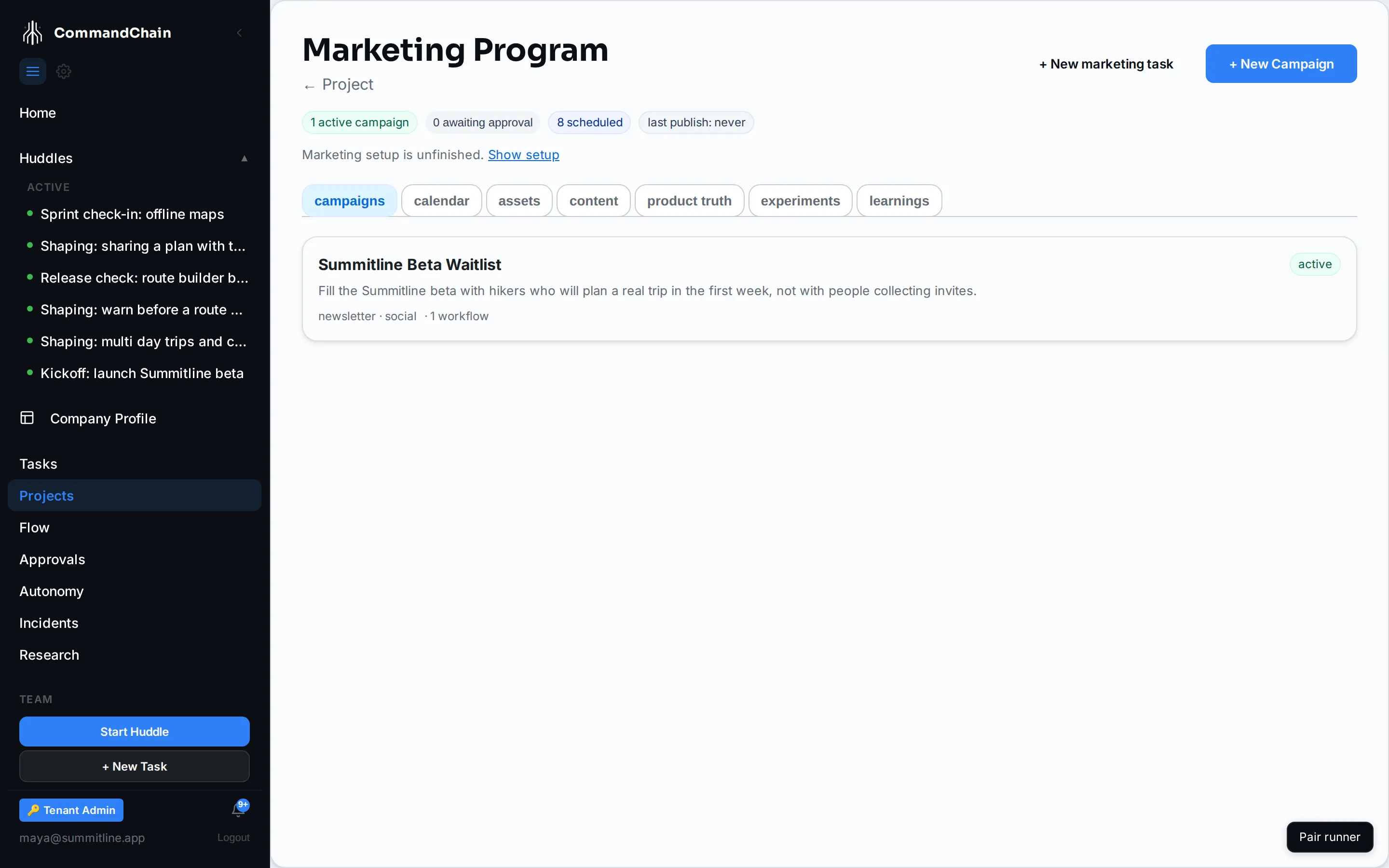
The strip at the top
Section titled “The strip at the top”Four counters, and they are the fastest read on whether the loop is turning:
| Counter | What it counts |
|---|---|
| active campaigns | Campaigns in the active status |
| awaiting approval | Assets sitting in in_review |
| scheduled | Assets with a publish date in the future |
| last publish | When something last went out, or never |
awaiting approval is also a button: clicking it opens the assets view filtered to exactly those assets, so the count is always one click from the work it describes.
The seven views
Section titled “The seven views”The first three are where content is made, and the four after them are where it is grounded, measured, and learned from.
campaigns lists every campaign in the project with its objective, channels, and how many workflows are running on it. The primary action, + New Campaign, lives here. See run a campaign.
calendar is a month grid of every asset with a date on it, scheduled or already published. Drag a scheduled asset to another day to move it, or open it and use the date picker. Chips above the grid filter it by channel and by campaign. See plan the content calendar.
assets is the library: everything drafted, composed, imported, uploaded, or derived, with its type, channel, status, and date. + Add asset is here, with four ways in: compose a draft, import text, link a URL, or upload a file. See work with content assets.
content ranks the articles you have published against each other, which is the comparison neither the campaign panel nor a single asset can answer. One row per article, with pageviews, sessions, search impressions, search clicks, and average position over the last 7, 28, or 90 days, 28 by default. A decay column watches for an article losing the search impressions it used to earn, and offers Propose refresh on the ones that are. Backfill history and the link to the topic coverage map are here too, and a panel under the table opens the top search queries the project is shown for. Clicking a row opens the same asset drawer as everywhere else. See metrics and attribution and publish an article.
product truth is read-only, and it is the list of facts an agent is allowed to claim about this project, assembled from work that already happened. See product truth.
experiments is the project’s deliberate comparisons: four counters across the top, then every experiment in the project, each opening a detail page with its arms, its stop rule, and its verdict. See run marketing experiments.
learnings browses what the workspace has concluded, not only this project. Every accepted learning, newest first, filterable by text, by verdict, and by project, with retired ones hidden until you ask for them. See learnings.
What to do first
Section titled “What to do first”If the project has never been marketed, do these in order. Each one makes the next better.
The Campaigns tab opens with a marketing setup panel that walks these steps for the project you are in and tracks them there. It reads what is done from the project’s live state rather than from anything you tick, moves on by itself as each step lands, and can be hidden and brought back without losing anything. Launch a project’s marketing walks its five phases one by one. The list below is the same path in prose.
- Fill in the project’s marketing context from the project’s Positioning tab: who this is for, how it is positioned, and the messages that carry it. See marketing context.
- Create a campaign with one objective and one number you will judge it on.
- Run a workflow on that campaign, review the plan it proposes, and launch it.
Next steps
Section titled “Next steps”- Run a campaign: objective, workflow, launch, monitor.
- Marketing context: the two layers agents read before they write.
- The marketing loop: why the home is shaped this way.