

Incidents and autonomy demotion
An incident is the platform saying an agent’s autonomy went further than it should have. It is the mechanism that makes raising a level safe to try: the way back down is automatic and does not need you to notice.
What opens one
Section titled “What opens one”Autonomy is capped twice. The level decides whether an action asks first; a guard threshold caps how many times a class may act automatically in a rolling day.
When a class running at L2 or L3 breaches that cap, three things happen in order:
- The action falls back to L1. It is not executed. An approval is raised instead, and it waits for you like any other request in the approvals queue.
- The breach is recorded as an incident against that action class.
- The class is demoted one level, immediately and without asking.
The point of the ordering is that nothing runs while the platform works out what happened. A runaway class stops on the first action past the cap, not on the hundredth.
What demotion does
Section titled “What demotion does”One level down, never below L1: L3 becomes L2, L2 becomes L1, and L1 stays where it is. The change is recorded as made by the autonomy guard rather than by a person, so an unexplained drop always has an incident behind it.
The platform never raises a level on its own. Demotion is automatic; promotion is a graduation proposal you approve. That asymmetry is deliberate: getting more cautious should be free, and getting less cautious should cost a decision.
Where you see it
Section titled “Where you see it”Autonomy in the sidebar is the effect of every incident in one table.
- Incidents · 30 days across the top, coloured when it is not zero.
- Per class: the current Level, Actions · 30d, the Approval rate, and its Incidents count.
A class that has dropped a level reads as the level it is at now. The incident count beside it is why.
An incident also raises the bar for getting back up: the graduation evaluator requires zero incidents in the trailing window, alongside twenty actions and a 95% approval rate. So one incident does not just demote a class, it holds it down until a clean month has passed.
Reading an incident record
Section titled “Reading an incident record”Incidents in the sidebar lists them, filtered by Open, Investigating, Resolved, and Won’t fix. Opening one is the whole story of a single breach.
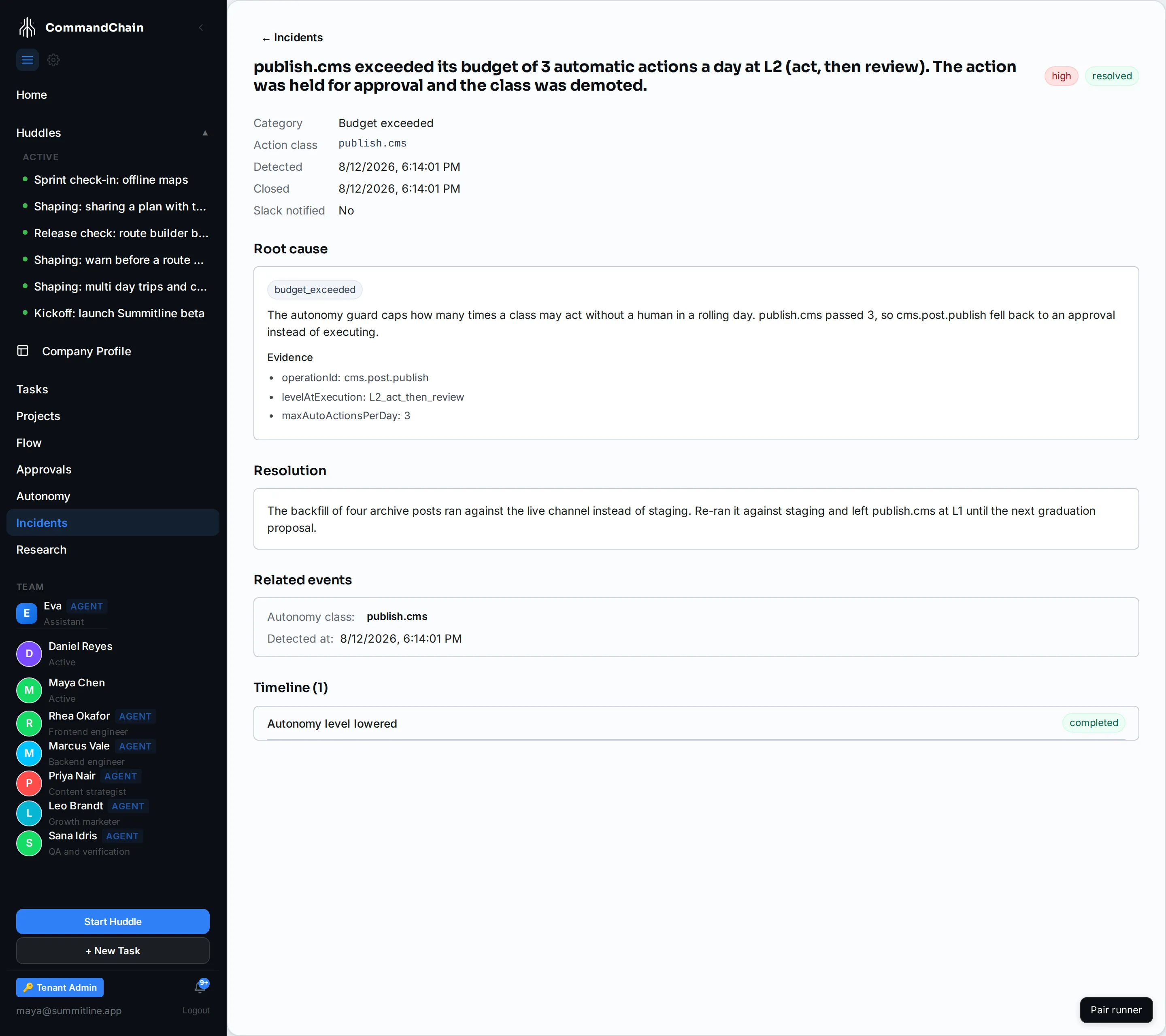
| Section | What it holds |
|---|---|
| Header | The summary sentence, the severity, and the status |
| Category | Budget exceeded, agent failure, policy block, or checks failed |
| Action class or Task ID | What it is about. A guard breach names the class; an incident about one piece of work names the task |
| Root cause | Why the platform decided this, and the evidence it decided on |
| Resolution | Your note, once it is closed |
| Timeline | What the platform did about it. A guard breach carries Autonomy level lowered |
Alpenglow’s is the one above: a backfill of four archive posts ran against the live channel, publish.cms went past its three-a-day cap on the fourth, the platform held that publish for approval, and the class dropped to L1.
Closing one
Section titled “Closing one”Resolve takes a note and closes the record. Write what actually changed rather than “fixed”: that note is what the next person reads when the same class demotes again, and it is the only place the reason survives.
Raising a level again
Section titled “Raising a level again”Fix the cause first, then let the evidence rebuild. The path back is:
- Understand why the cap was hit. A class that legitimately needs more headroom is a different problem from one that misbehaved.
- Clear the incident, with a note.
- Wait for the trailing window to come clean, and decide the graduation proposal when the evaluator raises it.
Next steps
Section titled “Next steps”- The autonomy ladder: the levels, the classes, and what is hard locked.
- Work the approvals queue: where a demoted class sends its work.
- Budgets: the other cap, on spend rather than on autonomy.