

The integration registry
Settings → Integrations is where an external service becomes something agents can act through. It needs the manage_integrations permission.
The registry has five layers, and each one is a separate decision:
- The integration describes the service: base URL, auth type, and the operations it offers.
- A credential is the secret that authenticates to it.
- A connection pairs an integration with a credential and an account.
- A binding maps one of your workspace’s category operations onto one of that service’s endpoints.
- Activation turns a verified binding on.
Nothing acts through an integration until step 5. That ladder is why publishing something is a deliberate act rather than an accident of having pasted an API key.
Add an integration
Section titled “Add an integration”The fastest path is the catalogue. + New Integration offers entries that arrive complete with their base URL, auth type, endpoints, and category. Seven ship today: WordPress, Mailchimp, Google Analytics 4, Google Search Console, X, Threads, and a generic webhook. Alpenglow’s registry holds three of them.
Two things a catalogue entry states before you import it, because both decide whether it is worth importing at all. A metered provider shows what it charges per publish and per read, so pay-per-use is visible up front rather than at the end of the month. A provider that cannot be connected without out-of-band setup shows that as a note on the entry: Threads, for instance, will not connect until your Meta app lists the account as a tester. Connect social platforms walks through both social entries end to end, and the WordPress and Google entries linked above each have a setup page of the same shape.
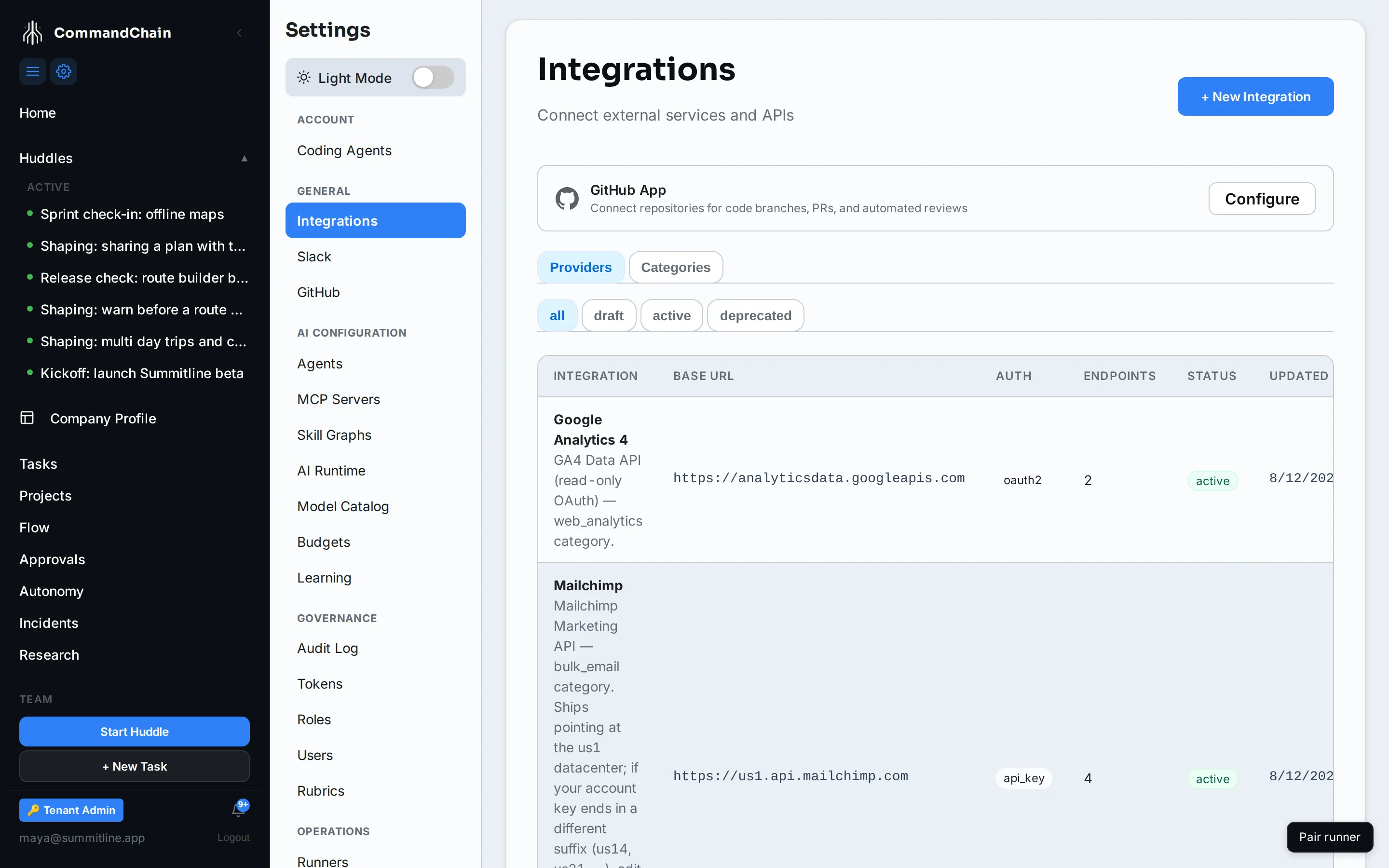
You can also describe a service by hand, with its base URL, auth type, and endpoints, when it is not in the catalogue.
Give it a credential
Section titled “Give it a credential”The credential form matches the integration’s auth type: an API key, a bearer token, a basic username and password, an HMAC secret, an OAuth2 client, or aws_sigv4 for an external API that expects request signing.
Once saved, a secret is never readable again. The credentials list shows its type and its dates, never its value, and rotating one replaces it in place so the connection keeps working.
OAuth2 is different, because the consent screen belongs to the provider. Connect sends you to them, they send you back, and the credential is written from the grant. Alpenglow’s Google Analytics entry is registered and deliberately unconnected: reaching the token needs a Google account, and there is no way to fake that half.
Connect and assign
Section titled “Connect and assign”A connection is an integration plus a credential plus the account it points at. A workspace can hold several: one Mailchimp connection per list, for instance.
Assignments decide which projects a connection serves, so a launch project can publish to one place and a second project to another without either seeing the other’s credential.
Bind a category operation
Section titled “Bind a category operation”The Categories tab is the half that matters for agents. It lists your category operations (cms.post.publish, bulk_email.campaign.send, web_analytics.metrics.query) and shows which are covered.
The lifecycle of a binding is three states:
- Proposed. Someone has mapped the operation onto an endpoint, including how the request fields and the response fields translate. Nothing runs.
- Verified. The mapping has been exercised against the real service and answered as expected. A verify runs the actual call, which is what makes this step meaningful.
- Active. Agents may use it.
An operation with no active binding is simply unavailable: an agent asked to publish reports that there is nothing to publish through, rather than inventing a way.
Some operations show more than one binding, all active, and that is correct. A provider sometimes needs a different call for the same operation depending on what it is given: WordPress publishes an article it has never seen by creating a post, and publishes one it already holds as a draft by updating that draft in place. Each binding says which inputs it serves, and exactly one runs per call. Leave both active. Disabling one leaves the operation unable to answer half the requests it gets.
Next steps
Section titled “Next steps”- MCP servers: the other way to give agents an outside capability.
- Connect Slack: a connection with its own page.
- Marketing autonomy: what an agent may do through an active binding without asking you.