

Read the cockpit
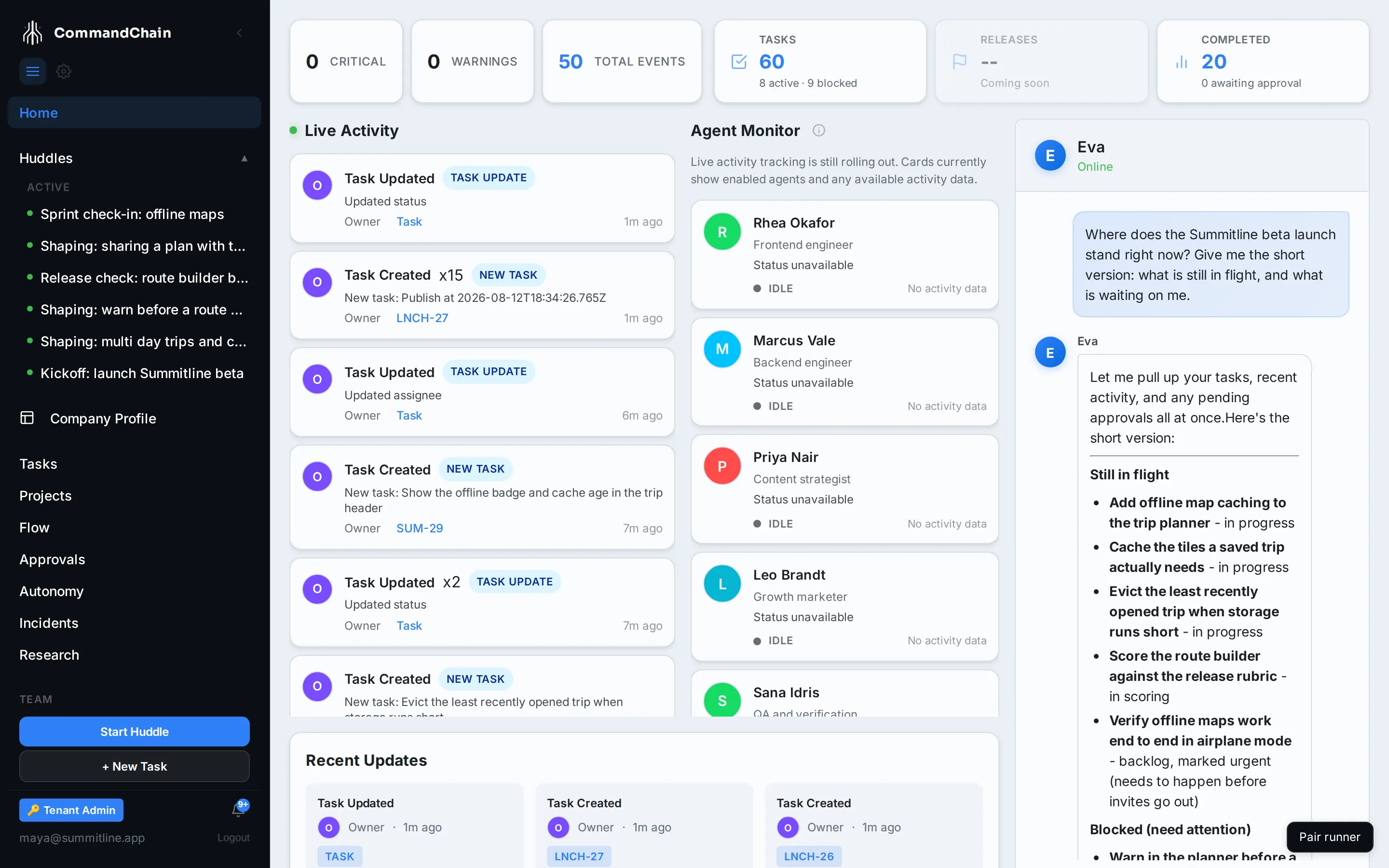
The cockpit is what Home opens onto, and it is built to answer one question in a glance: what happened while you were away, and what needs you now. This page names every panel on it.
The attention row
Section titled “The attention row”Three counts across the top, read from the most recent workspace events:
- Critical, events flagged as needing a decision.
- Warnings, events worth a look but not urgent.
- Total Events, everything in the current feed window.
The row is a temperature reading, not a queue. Anything that genuinely needs your decision also lands in approvals and in your notifications.
Stat tiles
Section titled “Stat tiles”| Tile | What it counts | Where it goes |
|---|---|---|
| Tasks | Every task in the workspace, with the active and blocked split underneath | The task list |
| Releases | Release activity. Reserved: it reads “Coming soon” until releases land | Nowhere yet |
| Completed | Tasks that reached done, with the count awaiting approval underneath | The approvals queue |
The Tasks tile reads -- rather than 0 when your account cannot list the whole workspace. A dash means “not visible to you”, which is a different thing from “none”.
Live Activity
Section titled “Live Activity”The event stream, newest first, updating as work happens. Consecutive events of the same type from the same actor collapse into one row with a count, so an agent taking twenty steps does not push everything else off the screen.
Agent Monitor
Section titled “Agent Monitor”One card per enabled agent, with whatever activity data that agent has reported. The panel says so itself: live activity tracking is still rolling out, so treat the cards as a roster with status rather than a live process monitor.
Recent Updates
Section titled “Recent Updates”Below activity, the most recent update per entity: a huddle, a project, a task (shown by its short key), or a pull request. One row per thing, so a busy task appears once rather than fifteen times, and each row links to the thing it names.
The Eva chat panel
Section titled “The Eva chat panel”The right third of the cockpit is a conversation with Eva. Ask for a briefing on where the launch stands, ask her to create work, or ask her to take you to a page. The conversation persists, so you can pick it up tomorrow.
Next steps
Section titled “Next steps”- Jump anywhere with the command palette: the fastest path to a task, project, huddle, or teammate.
- Act on notifications: what generates one and how to clear it.
- Work in the Task Workspace: where a task from the feed opens.