

Managed runner credentials
This page is only about runs on CommandChain’s managed servers. A runner on your own machine keeps its own sign-in there and uploads it only if you choose to push it for managed runs.
A managed run needs a login from you. The runner reads the login you already have on your machine and uploads it to your account, where it is released to one attempt at a time. Uploaded logins are per user, never shared across your workspace.
Upload what is on this machine
Section titled “Upload what is on this machine”On a paired Mac or Linux machine where you are signed in to that agent, open the runner with commandchain-runner and press c for Managed login. Or use the commands:
commandchain-runner creds push # detect all three agents, upload what is foundcommandchain-runner creds push --agent codex # one agent onlycommandchain-runner creds list # what is stored, metadata onlycommandchain-runner creds rm claude-code # delete one stored credentialThese authenticate with the runner’s pairing credential. Add --url https://your-commandchain if the machine is paired with more than one.
A successful push says what it uploaded and where it went:
$ commandchain-runner creds push --agent claude-code✔ claude-code: uploaded oauth credential (secretRef: /commandchain/local/alpenglow/users/user-maya-chen/agent-creds/claude-code)Done: 1 uploaded, 0 failed.Where it looks
Section titled “Where it looks”| Agent | Source | Result |
|---|---|---|
claude-code | $CLAUDE_CONFIG_DIR (else ~/.claude) credentials file, else ANTHROPIC_API_KEY or CLAUDE_API_KEY in the environment | OAuth or API key |
codex | $CODEX_HOME (else ~/.codex) auth.json, which holds either subscription tokens or an OpenAI key | OAuth or API key |
gemini | GEMINI_API_KEY or GOOGLE_API_KEY in the environment, else ~/.gemini login state | API key or OAuth |
claude-code, codex, gemini with --from-runner-signin | the runner’s own store under ~/.commandchain/agent-auth/<agent>/ | OAuth or API key |
With the default sign-in only setup, creds push and the c key are the only parts of the runner that ever read these. No run here reads your own login unless you turn on full setup, and the runner’s own sign-in is uploaded only if you push it.
Pushing the runner’s own sign-in
Section titled “Pushing the runner’s own sign-in”If you signed this runner in with commandchain-runner signin, reuse that login for managed runs without entering anything again:
commandchain-runner creds push --agent claude-code --from-runner-signinIt never happens by itself. Bare creds push still reads only your personal login, and --from-runner-signin needs --agent, so one named agent’s sign-in goes up and nothing else. An OAuth push needs the same acknowledgment as any other: type the phrase, or pass --accept-oauth-risk.
API keys are preferred over subscription logins
Section titled “API keys are preferred over subscription logins”If a machine has both a provider API key and a subscription (OAuth) login for the same tool, push uploads the API key and tells you why:
claude-code: found both an OAuth login and a provider API key, pushing the API key (preferred: revocable, and avoids the provider terms-of-service risk of cloud use of a personal subscription login).Uploading a subscription login is an explicit decision
Section titled “Uploading a subscription login is an explicit decision”Pushing an OAuth login lets a runner act as you, with your personal subscription, on a machine you may not be sitting at. That is worth a deliberate act, so the CLI will not do it quietly.
Interactively, it prints the risk and requires you to type an exact phrase:
$ commandchain-runner creds push --agent claude-code⚠ You are uploading your personal Anthropic (Claude) SUBSCRIPTION login (OAuth) to CommandChain so a cloud runner can act as you. This may violate Anthropic (Claude)'s terms for non-interactive/cloud use and puts your personal account at risk if the platform is compromised. Prefer a provider API key where possible. Type 'i understand' to continue:Non-interactively there is no prompt, so the push fails unless you pass the flag that says the same thing:
$ commandchain-runner creds push --agent claude-code < /dev/null⚠ You are uploading your personal Anthropic (Claude) SUBSCRIPTION login (OAuth) to CommandChain so a cloud runner can act as you. This may violate Anthropic (Claude)'s terms for non-interactive/cloud use and puts your personal account at risk if the platform is compromised. Prefer a provider API key where possible.✖ claude-code: OAuth upload aborted - non-interactive session. Re-run with --accept-oauth-risk to acknowledge the risk explicitly.Done: 0 uploaded, 1 failed.What you acknowledge is recorded with the credential, so the account page can show that a stored login carries that risk.
Listing shows metadata, never a secret
Section titled “Listing shows metadata, never a secret”creds list prints what is stored server-side. There is no view, anywhere in the product or the API, that returns credential material:
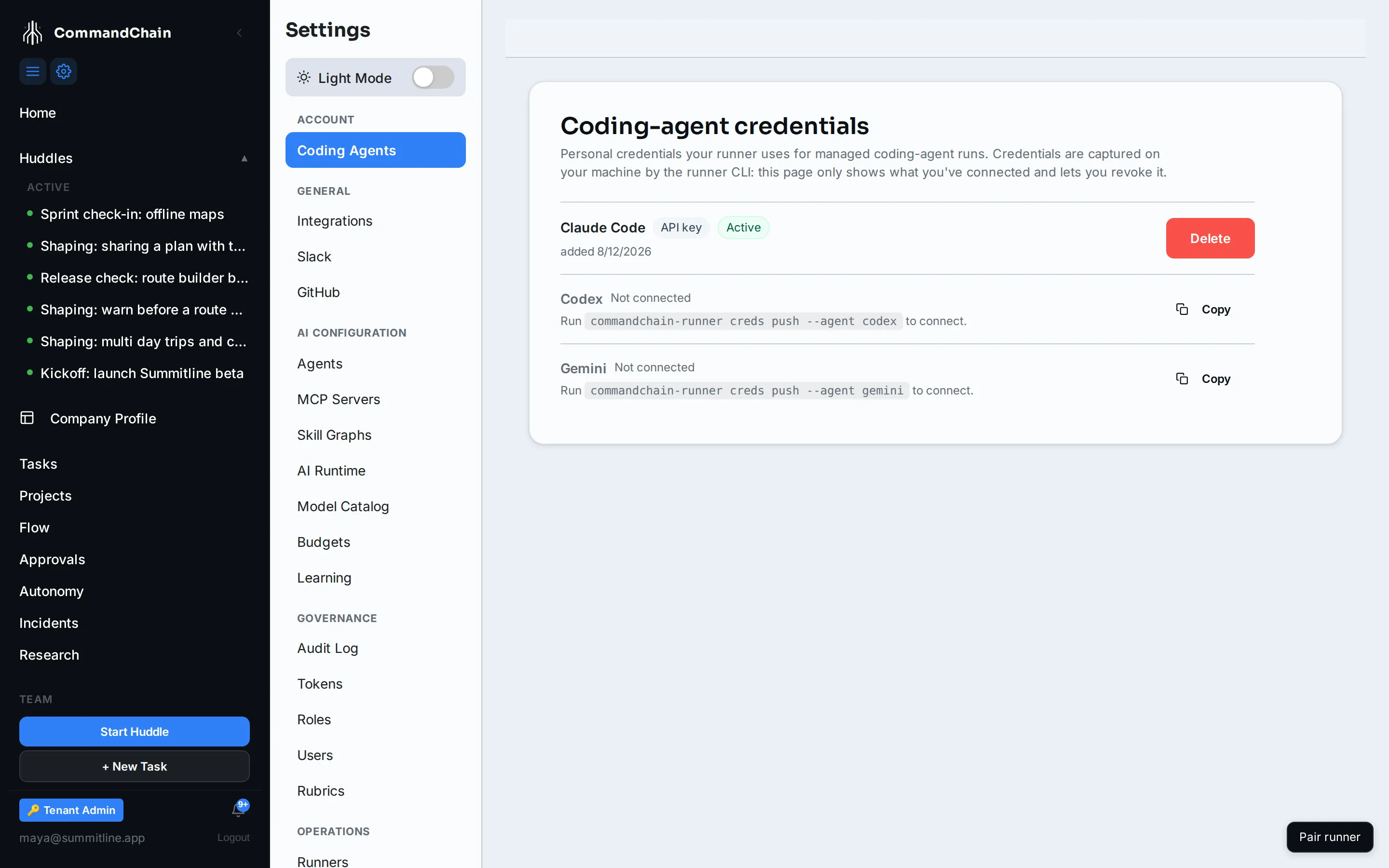
$ commandchain-runner creds listAGENT AUTH EXPIRES UPDATEDclaude-code oauth 2026-07-24T03:13:08.865Z 2026-07-23T20:30:54.596ZThe app shows the same under Settings, then Coding Agents, titled AI account logins for managed runs, one action per row:
Upload debug logging runs through a redaction mask, so a credential value cannot reach a log line even at the highest verbosity.
One attempt, one release
Section titled “One attempt, one release”When a managed run starts, the platform releases the credential for that attempt only. The runner stages it into the attempt’s synthetic home, the agent uses it, and the whole tree is deleted when the attempt ends. Nothing is written into the workspace.
A second release request for the same attempt is refused with a conflict, by design: an attempt needs its credential once, at the start, so a second ask means a secret already handed out. If you see that conflict, look at the attempt history, not the credential.
When a huddle agent cannot sign in
Section titled “When a huddle agent cannot sign in”The runner shows agent diagnostics in Activity, and errors stay in a separate review queue after routine activity scrolls away. Press e to read the full error, use the arrow keys to scroll, and press Enter to dismiss it. Esc leaves it undismissed.
On a managed run, CommandChain refreshes stored Codex tokens near expiry. If the
provider rejects that, sign in to Codex again on your machine, press c on the
runner screen (or run creds push --agent codex), and retry. On your own runner,
press s instead to check its sign-in.
Revoking
Section titled “Revoking”creds rm <agent> deletes the stored copy, and so does Delete on the Coding Agents page. Either way it is immediate:
$ commandchain-runner creds rm claude-code✔ removed stored claude-code credentialManaged runs that need it fail until you upload a new one. Your own login and any runner’s own sign-in are not touched.
Next steps
Section titled “Next steps”- Sign-in only or full setup: what a runner on your own machine signs in with.
- Coding agents: which tool a credential belongs to.
- The security model: the synthetic home a released credential is staged into.
- Troubleshooting: runs that fail for want of a credential.