

Read the Flow board
Flow in the sidebar is one row per initiative: what it is, the stage it has reached, and what it is waiting on. It is the shortest answer to “what is actually moving this week”.
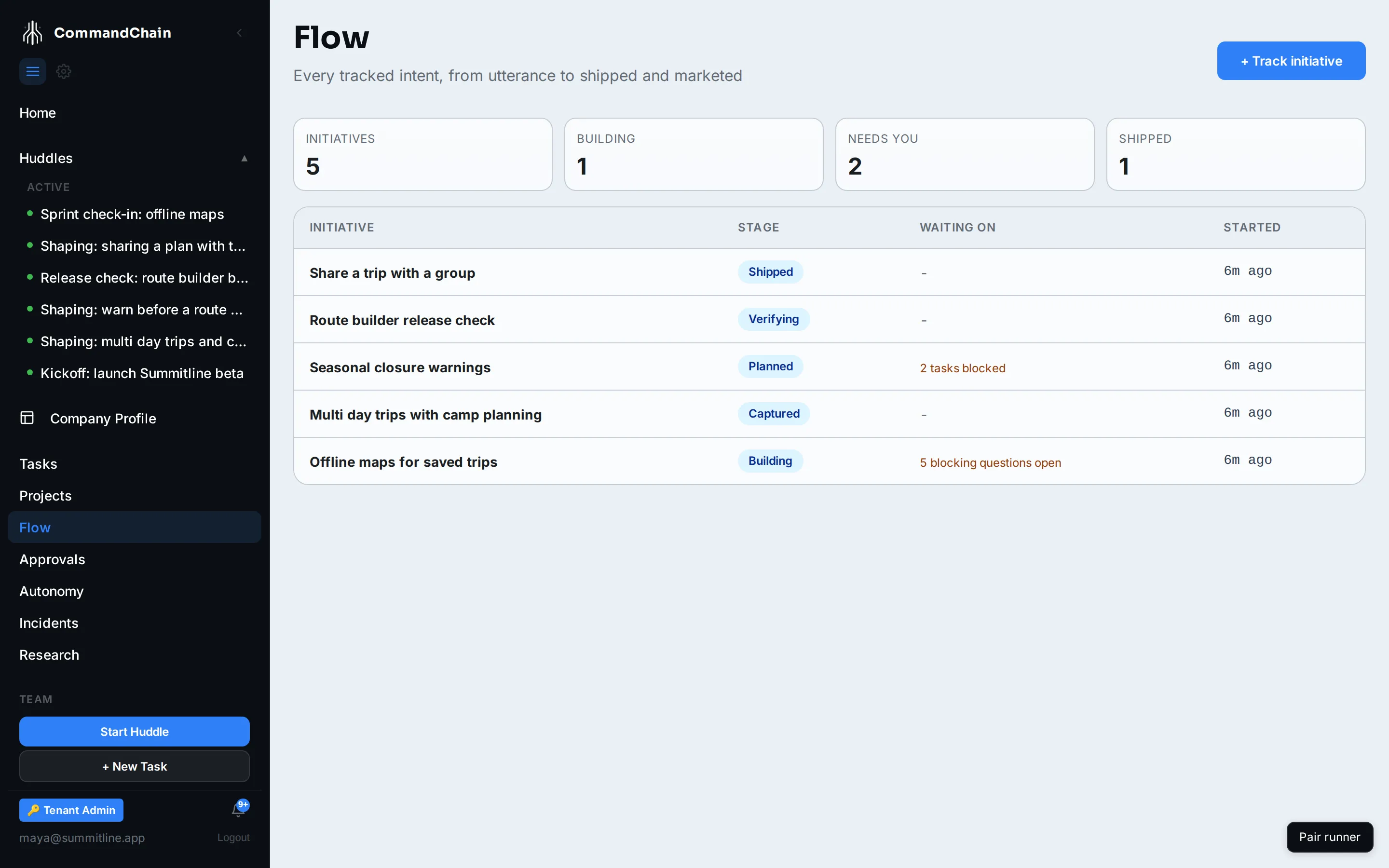
The four counters
Section titled “The four counters”Across the top: Initiatives (everything tracked), Building (work under way right now), Needs You (initiatives with at least one blocker), and Shipped (shipped or already being marketed).
Needs You is the one to read first. It counts initiatives that are stopped on something a person has to do.
The stage line
Section titled “The stage line”An initiative moves along one line, and later stages win: an initiative with a published asset reads as marketing even though its tasks are also done.
| Stage | The board shows this when |
|---|---|
| captured | Intent exists and nothing has been planned from it yet |
| planned | Drafts were accepted, or tasks exist, but none has started |
| building | At least one task is still being worked, or a run is active |
| verifying | Every task is built: for work in a repository, its branch has merged, but a verification gate has not passed |
| shipped | Every task that was not cancelled is done: for work in a repository, its branch has merged, and nothing is holding it |
| marketing | Something derived from this work has been published |
Nobody sets these. The stage is recomputed from the initiative’s tasks, drafts, checks, and published assets every time the board is read, so a card cannot be dragged to make a week look better than it was. See initiatives and flow for why that matters.
The Waiting on column
Section titled “The Waiting on column”The blockers, in the words the board uses:
| What you see | What is true |
|---|---|
N blocking questions open | The huddle behind it asked something nobody has answered |
N tasks blocked | Work is in the blocked status |
N approvals waiting | An approval task on this initiative has not been decided |
verification failed (N checks) | A check ran against the work and did not pass |
Each has a person-sized action behind it, which is why the board leads with them rather than with a percentage complete.
Track an initiative
Section titled “Track an initiative”-
+ Track initiative.
-
Pick the huddle where the intent was expressed. That anchor is what lets the journey reach back to a decision.
-
Give it a title, or leave it to take the huddle’s.
-
Track creates it and opens its journey.
Next steps
Section titled “Next steps”- Follow an initiative’s journey: the receipt trail behind one row.
- Work the approvals queue: where the “approvals waiting” blocker is cleared.
- Initiatives and flow: why stage is computed rather than claimed.