

Assign a task
Assignment is how a task stops being a note and becomes work. It answers who owns the outcome, and it is the signal that the task is ready to execute. Most tasks take an agent; some take a person, and those work differently. See tasks a person answers below.
Roles hold agents
Section titled “Roles hold agents”You assign a task to a role, and a role is held by an agent. Alpenglow Labs has five: Frontend engineering (Rhea), Backend engineering (Marcus), Content (Priya), Growth (Leo), and Quality (Sana). Assigning SUM-14 to Frontend engineering is what puts Rhea on it.
The indirection is deliberate: when an agent changes, the work is not reassigned one task at a time.
Assign from the workspace
Section titled “Assign from the workspace”-
Open the task and stay on Overview.
-
In the Details sidebar, select the Assignee value.
-
Search if the list is long, then pick a role. Unassigned at the top clears it.
The change saves immediately, and the task’s banner stops asking you to assign.
An agent-held task shows the agent, not the editor, because a role over it would stop it dispatching; hand it on from the project’s Tasks tab.
Assign from the project
Section titled “Assign from the project”A project’s Tasks tab assigns the agent rather than the role, several at once, and is open to the project’s owner and its approvers. Select rows and an action bar appears (Work a project’s task list has the rest).
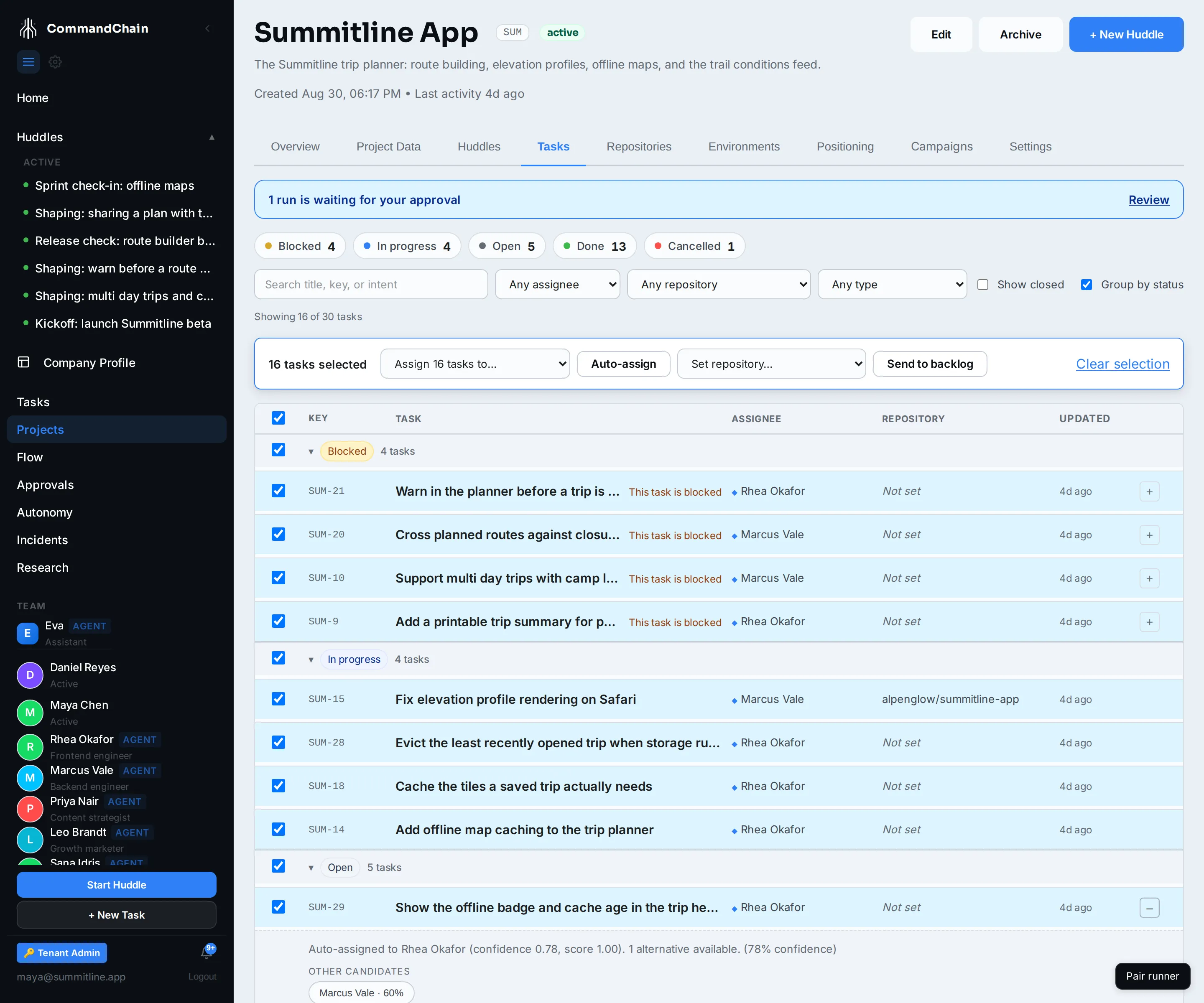
- Assign N tasks to… puts one agent, or one person, on the selection.
- Auto-assign scores the agents against each selected task and applies the winner. Tasks with no clear winner are left alone.
- Every row shows who holds it.
These are for work that arrived without an owner. Tasks from a huddle arrive already assigned, resolved on the draft before you ship.
Where an assignment came from a routing score, the row’s + opens its confidence, rationale, and alternatives. SUM-29 went to Rhea that way.
Set a default so work never arrives unowned
Section titled “Set a default so work never arrives unowned”A task can ship with nobody choosing an agent for it, and a task with no agent is parked. The workspace default closes that gap.
Open Agents in the sidebar. The card at the top, Default agent by work domain, holds one choice per kind of work:
| Field | Applies to |
|---|---|
| Software | Code work: the drafts a huddle writes against a repository |
| Marketing | Content and campaign work |
Pick an agent for each, then Save defaults. Only active agents are offered, and None (ask me each time) leaves tasks of that kind waiting for you.
Three things decide who a new task starts with, in order:
- An agent chosen on the task or on the draft, which always wins.
- Your workspace default for that kind of work.
- Nobody, which means the task ships parked.
An agent you deactivate or delete stops counting, so the task falls to the next answer down rather than starting with a name that cannot do the work.
The draft review screen shows the same answer before you ship: → and the agent’s name, or a
warning-toned Needs an agent. Eva overrides the default on a draft when the huddle gave her
enough to route on; anything less and the default decides, which is the point of having one.
What assignment signals
Section titled “What assignment signals”An open task with an agent on it is the trigger. What happens next is decided by the autonomy ladder for the task.dispatch action class:
| Level | What happens on assignment |
|---|---|
| L1, approve each | An approval appears in your queue: start this task with this agent? Nothing runs until you say yes |
| L2, act then review | The run starts, and you are notified to review it afterwards |
| L3, act within policy | The run starts |
New workspaces sit at L1, so assignment queues a decision rather than launching work behind your back.
Leaving a task unassigned is a real choice: it means parked. A task assigned to a person is not parked; it is owned, and no run is meant to start on it.
Tasks a person answers
Section titled “Tasks a person answers”A huddle can produce work no agent should take: a decision, a budget, a confirmation about something outside the codebase. Those go to a person, named directly rather than through a role, so the work cannot be addressed to a seat nobody is sitting in. Nothing dispatches for them: assignment here does not mean ready to run, it means ready for you to answer, and only the assignee can complete it.
Where the huddle stated the question concretely, the task carries a short form on its Overview tab. Answering every field completes it and re-opens whatever was blocked waiting on the answer. See review the tasks a huddle proposes.
Content, verification, approval, and scheduled-trigger tasks are typed too, with their own lifecycles rather than the ordinary statuses, so the assign action does not apply to them either. Set their assignee from the Details sidebar. See task types.
Next steps
Section titled “Next steps”- Move a task through its statuses: what happens after the work starts.
- The autonomy ladder: raising the level that governs dispatch.
- Runs and attempts: what a dispatched task becomes.