

Launch a project's marketing
A project that has never been marketed lacks one thing: a way to find out what the loop needs, in order. That is the marketing setup panel. It opens at the top of the project’s Campaigns tab and stays until the loop has turned once for that project.
The five phases
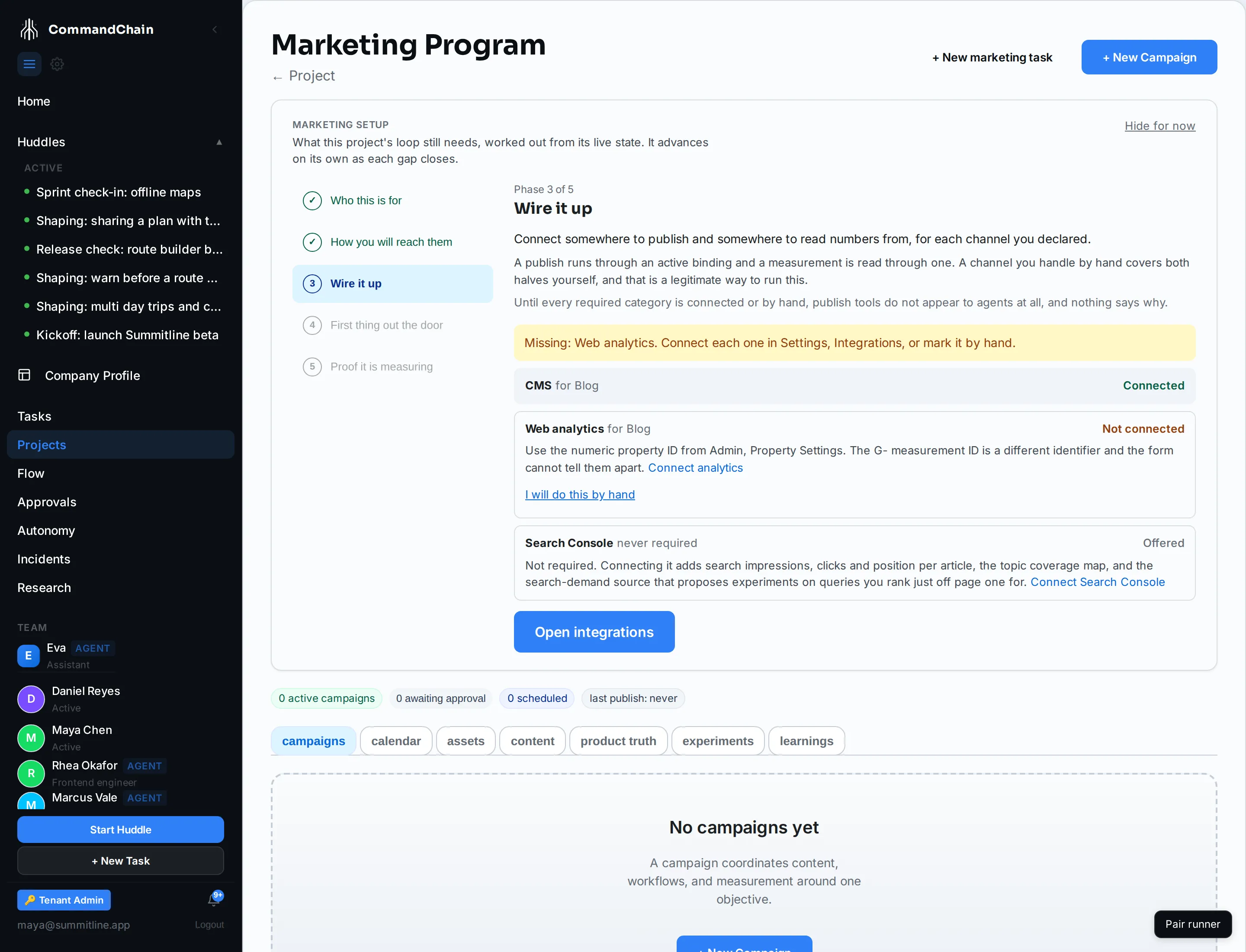
Section titled “The five phases”Every project walks the same five phases, in every channel mix. Only what phase 3 asks for changes.
| Phase | Job | Complete when |
|---|---|---|
| 1. Who this is for | Positioning, and a marketing agent that can be assigned | Positioning reads at least usable and a default marketing agent is set |
| 2. How you will reach them | Declare the channel mix | One or more of Blog, Social, Email, Other |
| 3. Wire it up | Connections for that mix only | Each connection the mix implies is active or marked by hand |
| 4. First thing out the door | A campaign, a workflow, a publish | One asset in the project reaches published |
| 5. Proof it is measuring | The first real number lands | A collected or hand-entered number lands on a published asset |
Phase 1 has two halves. Positioning readiness is a completeness measure, not a quality one: a section at 100 that says the wrong thing is worse than one at 60 that says the right thing. The agent half matters because without a default marketing agent, every marketing task a huddle produces merges parked and never dispatches, and nothing else tells you.
It reads your project, and it never blocks it
Section titled “It reads your project, and it never blocks it”The panel works out every phase from the project’s live state on each read. Nothing in it can be ticked off by hand: connect an integration in Settings and the row flips on its own; publish something and phase 4 completes without a click. It stores only two things, your decision to hide it and the channels you will run by hand.
It is never a gate: every action on the Campaigns tab works at every phase. Hide for now puts the panel away; the loop-health strip then carries one line, Marketing setup is unfinished, with a link that brings it back.
Phase 3 asks only for your mix
Section titled “Phase 3 asks only for your mix”Phase 2 decides phase 3. Each declared channel implies a publish path and a measurement path, and nothing else:
- Blog needs a CMS and web analytics. See Connect a CMS and Connect analytics.
- Social needs one social connection, which publishes and measures through the same account. See Connect social platforms.
- Email needs a bulk email connection.
- Other needs nothing.
Each row names the one trap that cannot be fixed afterwards and links the full procedure. Search Console appears as an offer on any blog project. It is never required: phase 3 completes without it. Connecting it later adds search impressions, clicks, and position per article, the topic coverage map, and the search-demand experiment source. See Connect Search Console.
Any row can be marked I will do this by hand. That is not a downgrade: you publish from your own account, Mark as published records the URL, and the numbers you type in feed baselines, evidence, and verdicts exactly like collected ones. The mark is reversible, and it is the only write phase 3 makes. See Publish by hand instead.
Phase 4 is a campaign with a workflow
Section titled “Phase 4 is a campaign with a workflow”Create a campaign on this tab, then pick the Launch Announcement template on the campaign page. It digests product truth, drafts the announcement, publishes it through approval, atomizes it into social posts, schedules them, and measures. Publishing stays at approve-each-time. See Run a campaign.
The publish itself records an activity counter. That is not a measurement, and phase 5 does not count it: the arc completes only when a number from a connection, or from your own hand, lands on what you published.
What arrives when
Section titled “What arrives when”Phase 5 has nothing for you to do. It has a wait, whose length depends on what you declared.
- Social and email land within hours of a post, on the collector’s six-hour pass. Hand-entered numbers land when you record them.
- Blog traffic usually lands the same day; a day still in progress keeps settling for up to two more days.
- Search takes days: Google has to index the page first, then Search Console lags a further two to three days. Days of zero at the start are normal, not a broken connection.
- The first learning is about eight weeks out for a content-first project: indexing first, then the 56 daily readings a decay verdict needs.
Where the wait is long, Backfill history on the content view is the accelerator: it pulls the provider’s own past for every published article, the fastest route to those 56 readings. See When the numbers appear.
A second project skips what the first one set up
Section titled “A second project skips what the first one set up”Integrations live in Settings and the default marketing agent is workspace-wide, so a second project in the same workspace opens with phases 1 and 3 already complete the moment its positioning is written, provided its mix needs nothing the first one did not connect. Nothing asks you to connect the same CMS twice.
Next steps
Section titled “Next steps”- Open a project’s marketing home: where the panel lives.
- Run a campaign: phase 4, step by step.
- Metrics and attribution: what the numbers mean once they land.