

Version history
Nothing in the profile is edited in place. Every change publishes a new version, the previous one stays exactly as it was, and the whole history is readable.
Reading the timeline
Section titled “Reading the timeline”Versions lists them newest first. Each entry carries its number, where it came from (a manual edit, an approved proposal, a restore), its readiness band, its change summary, who made it, and when. The one currently in force is marked Currently active.
Selecting a version opens it on the right: the change summary, who approved it, and Snapshot, which is the whole profile as it stood at that moment.
Diffing
Section titled “Diffing”-
Select the version you want to understand.
-
Compare with previous shows what that version changed. Compare to active shows how it differs from what is in force now, which is the one to use on an old version.
-
The diff groups changes by profile section and gives a count per section. Removed values are struck through, added values are underneath.
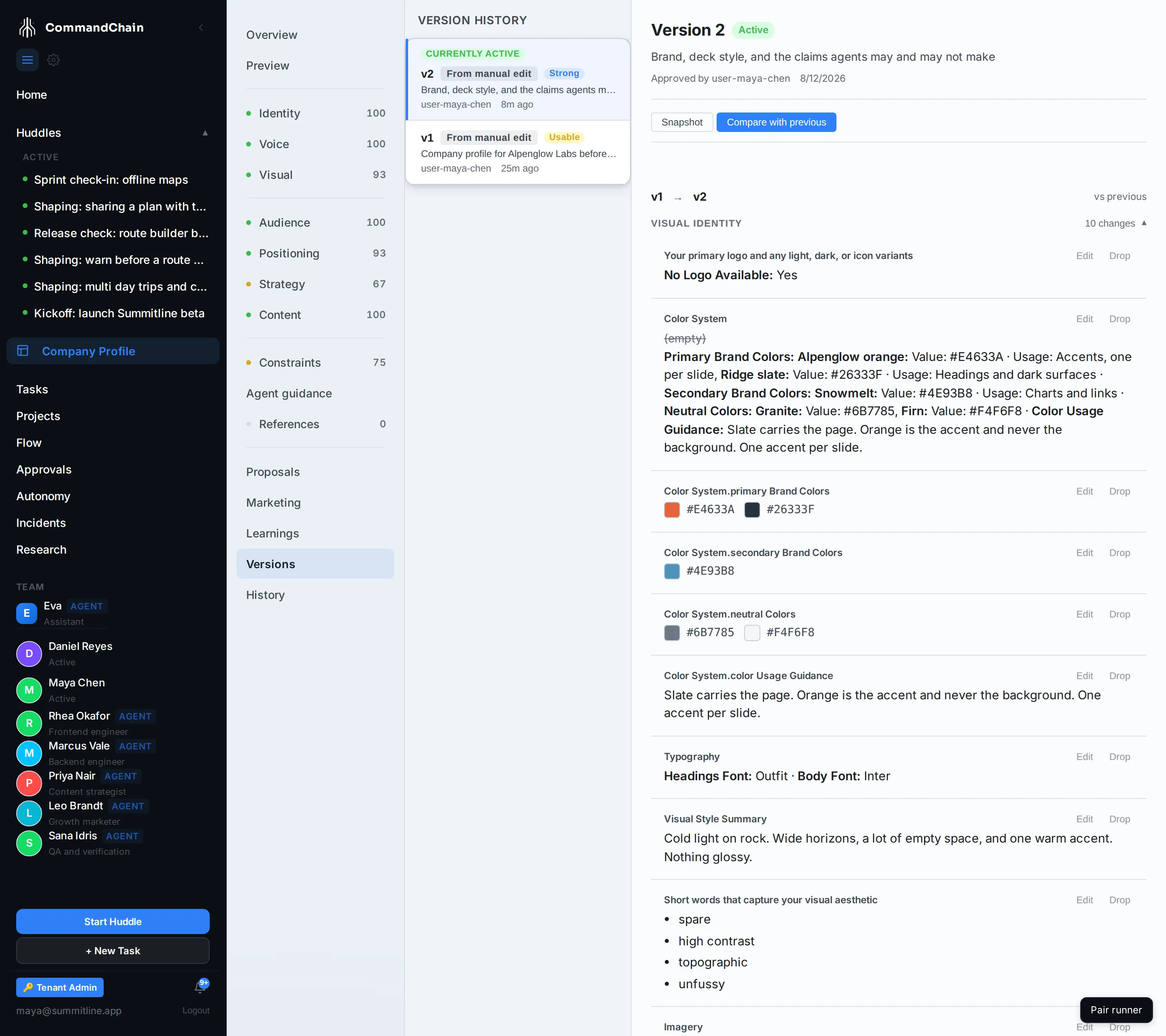
Alpenglow’s version 2 is the useful example: version 1 was the profile Maya filled in before the beta, and version 2 added the palette, the typography, the deck style, and the claims agents may and may not make. The diff is the answer to “what did we decide about the brand, and when”.
Restoring
Section titled “Restoring”Select a version other than the active one and Restore this version appears. It takes that version’s content and publishes it as a new version on top of the history, and it asks for a reason, which is required. The active version has no restore, because restoring what is already in force would do nothing.
That is the whole safety of it: restoring never deletes anything. The version you were unhappy with is still in the list, still diffable, and the restore is one more entry rather than an erasure.
The audit trail
Section titled “The audit trail”History is the record behind the versions, filtered by action. It carries setup, field changes, proposals created, approved, rejected, and superseded, versions created and restored, references added, approved, and rejected, readiness changes, and each time an agent used a version.
That last one is what makes the trail worth keeping. When a piece of work reads oddly, the question is usually “which version of the profile was the agent working from”, and this is where that is written down.
Next steps
Section titled “Next steps”- Review agent proposals: the other producer of versions.
- What the company profile is: the tabs each version holds.
- Audit and traceability: the wider record this sits inside.