

Run a research job
A research job is a question you hand over and come back to. The platform breaks it into sub-questions, searches, reads what it finds, writes a synthesis, and decides whether another pass would help.
Start one
Section titled “Start one”-
Research in the sidebar, then New research.
-
Write the query as a question or a topic. Alpenglow’s is “Competitive landscape of hiking trip planners”.
-
Leave Context on Background job unless the research belongs to a huddle, a task chat, or an Eva conversation.
-
Add a context description if the query alone is ambiguous. It is what stops a general search: Alpenglow’s says “Who else lets a hiker build a route from real trail segments and take it offline, and where they charge.”
-
Start research. You are taken to the job, which fills in as it works.
What it does
Section titled “What it does”The job moves through states you can watch: planning, searching, synthesizing, and sometimes refining before it reaches completed.
- Plan. The query becomes a handful of specific sub-questions. Vague questions produce vague sub-questions, which is the single biggest lever you have on the result.
- Search and read. Each sub-question is searched, and the promising results are fetched and read rather than skimmed from a snippet.
- Synthesize. Everything found is merged into one answer, with contradictions resolved in favour of better-corroborated sources.
- Refine. If the synthesis names gaps that more searching would close, the job runs another iteration aimed at those gaps. It stops when the gaps stop being answerable, when the iteration limit is reached, or when the budget cap is hit.
Every job runs under a cost cap. Configuration on the job page shows the caps it ran with: iterations, searches and fetches per iteration, whether the workspace corpus was included, and the budget cap.
Reading the results
Section titled “Reading the results”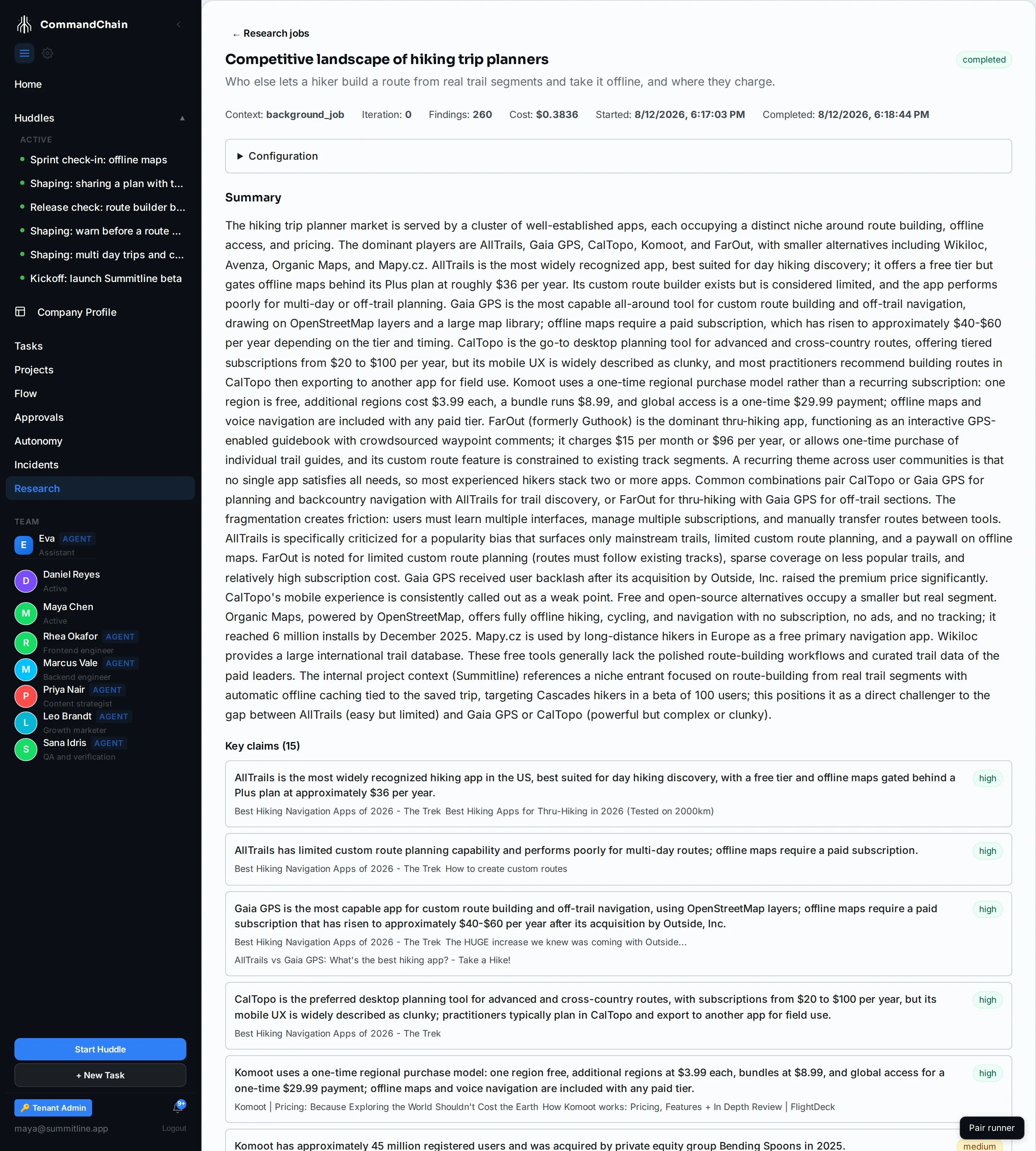
The page is four things, in descending order of how much you should trust them:
- Summary. Several paragraphs answering the question. This is the thing to read.
- Key claims. Individual factual statements, each with a high, medium, or low confidence and the sources behind it. High means several sources agree; low means one source said it and nothing corroborated it.
- Gaps. What the job could not answer. Read these before acting on the summary, because they are where the answer is thinnest.
- Findings. Every passage collected, with its sub-question and source. This is the working, kept so a claim can be traced back.
The header carries the numbers: iterations run, findings collected, cost, and how long it took.
What it needs
Section titled “What it needs”Research reaches the open web, so it needs a search provider key configured for your workspace. Without one, jobs fail immediately and the job page shows the reason rather than returning an empty result.
It also uses your workspace’s configured AI backend for the planning and synthesis steps, so the same requirements apply as for any other agent work.
Include vector search is on by default and adds passages from your own knowledge to the findings, so an answer can draw on what you already know as well as what the web says. It is available only when knowledge search is set up; without it the job runs on web sources alone.
A job started from inside a project reads that project’s knowledge, the same way knowledge search does: a job an agent starts in a huddle reads the huddle’s project, and a job Eva starts reads the project the conversation is in. A job with no project behind it reads the whole workspace.
Where else research appears
Section titled “Where else research appears”The same engine runs behind agents. An agent in a huddle can start a research job when a question needs evidence, and Eva can start one for you. Those jobs appear in the same list with their context set to the huddle or conversation they came from.
Next steps
Section titled “Next steps”- Search what the workspace knows: the inward-facing counterpart.
- Knowledge: what is in the corpus a job can draw on.
- Work with Eva: asking for research in conversation.