

The runner security model
A coding agent is a program with a shell, network access, and permission to edit files. Running one on your machine is only reasonable if it runs inside a boundary you can describe. This page describes it.
The short version: the operating system enforces the boundary, the runner refuses to start an agent without one, and the agent cannot read anything in your home directory, never sees your environment, and never sees the credentials the runner itself uses. The one thing you can widen is full setup, which lets runs use your own coding CLI folders and nothing else from your home.
The boundary, per operating system
Section titled “The boundary, per operating system”| Platform | Mechanism | How it is applied |
|---|---|---|
| Linux | Landlock, in the kernel | A small helper applies the ruleset and then becomes the coding agent, so the agent and everything it spawns inherit the restriction |
| macOS | Seatbelt (/usr/bin/sandbox-exec) | The runner writes a per-attempt profile, and sandbox-exec applies it and then becomes the coding agent |
Both are unprivileged. There is nothing to install, no kernel module, no daemon, and no sudo. Both apply the restriction and then execve the agent, which is the property that makes the shape work: the restriction survives becoming another program, so it covers the agent, its shell, its subprocesses, and its tools.
There is one place in the runner that turns a command line into a running agent, and that place applies the boundary. Adapters cannot spawn around it, because an adapter does not start processes itself. An audit of the source fails the build if any new place that starts a process hands it the runner’s environment without being a declared, justified exception.
Fail closed, with no override
Section titled “Fail closed, with no override”The runner does not conclude that a machine is safe from a kernel version, a feature list, or the presence of a helper binary. It proves it, on every start:
- It builds a real, restrictive policy.
- It runs a real child process through it.
- It requires the operating system to deny that child a read the policy never granted, and to allow one it did.
If that check fails, the runner does not run an agent on that machine. It reports why and points you at a managed runner instead. There is no flag, environment variable, or configuration setting that downgrades this to a warning, and there is no degraded mode.
You can run the same check yourself at any time with doctor.
The agent does not get your home directory
Section titled “The agent does not get your home directory”Every coding tool reads its configuration from your home directory before it does anything else: settings, plugins, MCP servers, and hooks. A hook is arbitrary code that the tool runs on your behalf. On your own machine that code is yours, chosen by you, and it has no business executing next to an agent working on a task.
So the runner does not lend the agent your home. Each attempt gets a synthetic home: a fresh directory tree, created for that attempt, holding exactly one thing: a copy of the runner’s own sign-in for that coding CLI.
<state>/cc-attempt-<attempt>-<agent>-<nonce>/ mode 0700 home/ the agent's $HOME config/ the agent's tool configuration directories tmp/ the agent's scratch spaceFour properties of that tree are deliberate:
- It is outside the git workspace. Anything inside the workspace could be committed by the agent and pushed to your repository.
- Directories are
0700and staged credential files are0600. On a shared machine the next user is not entitled to either. - The path carries a random value, so nothing can pre-create or symlink the directory an attempt is about to write its credential into.
- Nothing is copied back out, except a renewed sign-in the runner has checked. The agent may rewrite its own settings or cache inside that tree, and all of it dies with the attempt. When the coding CLI renews its sign-in during a run, the runner takes the new token back only if it is newer, belongs to the same sign-in, and has a plausible expiry and the same account, so parallel runs stay signed in. See sign-in only or full setup.
What an agent can never reach
Section titled “What an agent can never reach”Access is granted, never subtracted. Your real home directory is not granted, so everything in it is unreachable by omission rather than by a rule someone remembered to write:
~/.ssh, so the agent cannot read your keys. The runner’s own git still uses your SSH agent, because the runner is not the agent.- The credential files your cloud and infrastructure tools keep in your home directory.
- The macOS Keychain. On macOS the profile allows a specific list of system services by name, and the Keychain service is deliberately not on it, so the agent cannot ask the Keychain for your secrets even though ordinary system calls work. The one exception is full setup, which you turn on yourself, when your Claude Code sign-in is kept in the Keychain.
- Your own coding CLI folders, such as
~/.claude,~/.codexand~/.gemini. Only full setup grants them, and then only those folders. - Git’s executable configuration. Git runs code it finds in a repository: hook scripts and the command-valued keys in
config. Those paths are kept out of the agent’s reach, so an agent cannot plant a hook and wait for the runner to run git. See workspaces and git.
What it can still see
Section titled “What it can still see”The sandbox controls what can be opened, not what can be noticed. On Linux the agent can list the names of the files and folders anywhere on the machine, and on both platforms it can check whether a path you name exists and see its size and timestamps. On Linux that listing also covers /proc, so the agent can see which programs are running on the machine, not only what is stored on it.
What it cannot do is open any of them. The contents of anything the policy does not grant stay unreadable, which is why the ~/.ssh bullet above still holds: the agent can see that a key file is there, and it cannot read it. The same line holds for the processes it can see: their environments, their open files and their memory are reads the policy does not grant.
The Linux listing is there because the coding tools are single-file runtimes that read the filesystem root as they start, and a machine where that read is refused is a machine where the agent never starts at all.
When the boundary stops a program, the run says so
Section titled “When the boundary stops a program, the run says so”A process inside the boundary may read its own process details. That permission belongs to the agent itself and not to anything the agent starts afterwards, so a program launched during a task is refused it. A few programs read those details as they start and treat the refusal as fatal, and they stop there, before printing anything of their own.
That is deliberate and it is not adjustable on your machine. What changed is that it no longer looks like a build that failed for no reason: the run reports a program this task started could not run inside the task sandbox, on the task and on the runner’s own screen, with the two ways forward. The runner says it only when the program stopped without a word of its own and the boundary on that machine is then found to be the cause, so an ordinary crash is still reported as an ordinary crash. Runs on CommandChain’s servers get the same boundary, so this is not something moving the task fixes. See runner troubleshooting.
The environment allowlist
Section titled “The environment allowlist”The agent does not inherit the runner’s environment. Each agent process gets a built environment, from an allowlist, in this order:
- An execution baseline.
PATH,HOME,USER,LOGNAME,SHELL,TMPDIR,LANG,LC_ALL,LC_CTYPE,TZ,TERM, and the certificate-bundle paths a corporate proxy needs. Paths and locale, nothing more. Nothing whose value is a secret is allowed on this list. - The run’s selected environment. Your project’s deployment values, released for that attempt only, injected into the process and never written into the workspace.
- That adapter’s own sign-in, and only its own, plus the attempt’s synthetic
HOME,TMPDIR, and configuration paths. API keys exported in the runner’s environment are never passed on as a sign-in. This layer wins, so a project environment cannot point the agent back at your real home or substitute a stored key for the released one.
No coding agent receives another one’s key. Everything else is dropped, including the runner’s own control-plane credential, its tenant identity, GITHUB_TOKEN, cloud role credentials, NODE_OPTIONS, and any unrelated API key that happens to be exported in the shell you started the runner from.
Two entries are missing on purpose:
- Proxy variables are not on the baseline, because a proxy URL routinely embeds a username and password.
NODE_OPTIONSand similar are not on the baseline, because they execute code nobody asked for.
Tool servers and the boundary
Section titled “Tool servers and the boundary”A run can carry tool servers beyond the coding agent itself: the built-in knowledge and browser tools, and any MCP servers your workspace registered. Each sits in a defined place relative to the boundary above.
- Every tenant server is reached through the runner, not directly. Whatever the server is, the agent talks to a small proxy the runner starts, and the proxy talks onward. That is what makes a tool whitelist enforcement rather than advice, and it is why a server’s credential is never in the coding agent’s environment or configuration. The proxy holds it in a
0600file in the attempt’s directory, outside the git workspace, and it dies with the attempt. - A stdio server is a child of the agent, inside the same sandbox. It is a command on your runner’s machine, so it runs under the same Landlock or Seatbelt boundary as the agent that called it, with no extra grants. For that reason stdio servers attach only to coding runs, where the agent already has a shell. Chat and huddle turns have no shell, and they get no tenant servers at all rather than acquiring one this way.
- A remote server is a network call from inside the boundary. The sandbox deliberately leaves the network open (see the note above), so nothing needs loosening; what leaves the machine is the tool call, and what comes back is the tool result.
- The browser is a runner-managed process outside the sandbox. A browser cannot run inside the boundary, so the runner starts it as its own process, one per attempt, and the agent reaches it only through the browser tools. It is prevented from reading the machine’s files:
file://is refused by the tool and again by the browser itself. See browser in runs.
A broken tool server degrades rather than escalates: the server contributes zero tools for that run and the run continues. Nothing about a server being down or misconfigured widens what the agent can reach.
What the runner tells the control plane
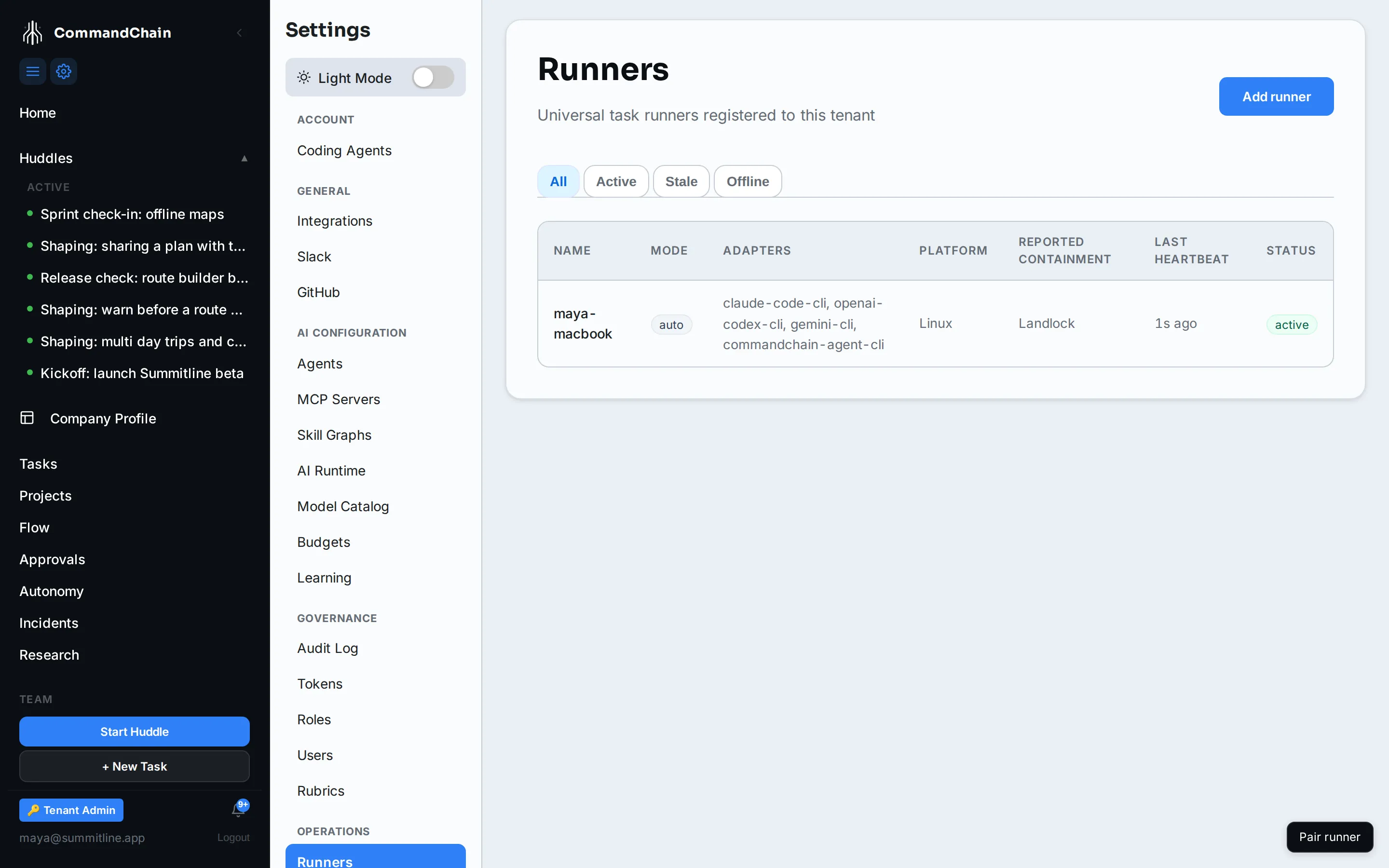
Section titled “What the runner tells the control plane”The runner reports its containment as exactly two fields: the platform and the tier. Kernel versions, helper paths, profile contents, and the rest of the diagnostic detail stay on your machine and are printed only by doctor, which says so in its own output.
The fleet shows those two fields per runner, so you can see at a glance that every machine taking work is contained:
Where credentials live
Section titled “Where credentials live”- The runner’s pairing credential is one
0600file in~/.commandchain. It is never printed, never a command-line argument, and never written into the service definition. - The runner’s own coding-agent sign-ins are
0600files under~/.commandchain/agent-auth, one folder per coding CLI. They never leave the machine, and each attempt gets a copy in its synthetic home that is deleted when the attempt ends. See sign-in only or full setup. - Logins uploaded for managed runs are stored in your workspace and released to a single managed attempt. A second release for the same attempt is refused. See managed runner credentials.
- Project environment values follow the same rule: released for one attempt, injected into the process, never written into the workspace.
Next steps
Section titled “Next steps”doctor: run the containment proof yourself.- Sign-in only or full setup: what a run signs in with.
- MCP servers: the tool servers a run can carry, and how they are scoped.
- Workspaces and git: why the runner pushes and the agent does not.