

Work with content assets
A content asset is one deliverable: a blog post, a social post, an email, a landing page, a case study. Assets are real records with a body you can read, not chat messages an agent wrote once.
Where they come from
Section titled “Where they come from”| Origin | How it gets here |
|---|---|
generated | An agent drafted it with the content tool, usually as a workflow step |
imported | You made it yourself with + Add asset: composed in the app, pasted, or uploaded |
reference | You recorded something that already lives elsewhere, by its URL |
+ Add asset offers four ways in. Compose is for writing a first draft directly in the app; Paste text, Link URL, and Upload file bring in something that already exists. Composed and pasted content both carry the imported origin, and that origin is why they always publish through human approval: the autonomy ladder only vouches for agent-generated content grounded in product truth.
Origin is not cosmetic. Content derived from an imported asset stays imported, so nothing can be laundered into the auto-publishable lane by passing it through a derivation.
Read one
Section titled “Read one”Click any row in the assets view, or any row in a campaign’s asset table. The drawer shows:
- the type, origin, channel, and campaign on one line,
- the body, in full, or a Download link for an uploaded file (the link is short-lived, minted when you click),
- metrics, once anything has been measured for it,
- lineage, when the asset was derived from another or has derivatives of its own,
- brand-safety lint results, after a publish attempt.
Edit and approve one
Section titled “Edit and approve one”Edit in the drawer header opens the title, body, channel, and campaign for text assets. Uploaded files are not editable in place; upload a new version instead.
Status moves with two small actions:
- a
draftoffers Mark approved, which records your editorial pass, - an
approvedasset offers Back to draft.
An asset in in_review offers neither. That status means a publish is already parked in the approvals queue, and the decision belongs there; the drawer links you to it.
Atomize one post into channel variants
Section titled “Atomize one post into channel variants”Atomization derives one asset per target channel from a source asset, and records the link back to the source on each one.
It happens three ways:
- Atomize in the drawer: add a row per target channel, pick each variant’s type, and create them all at once. The channel field suggests the campaign’s channels,
- as the atomize step of the Launch Announcement or Content Atomization workflow,
- by asking an agent that has the content tools to derive variants for named channels.
Each derived asset arrives as a draft, titled after its source with the channel in brackets, carrying a copy of the body to rewrite for that channel. From there it is an ordinary asset: rewrite it, give it a date, publish it.
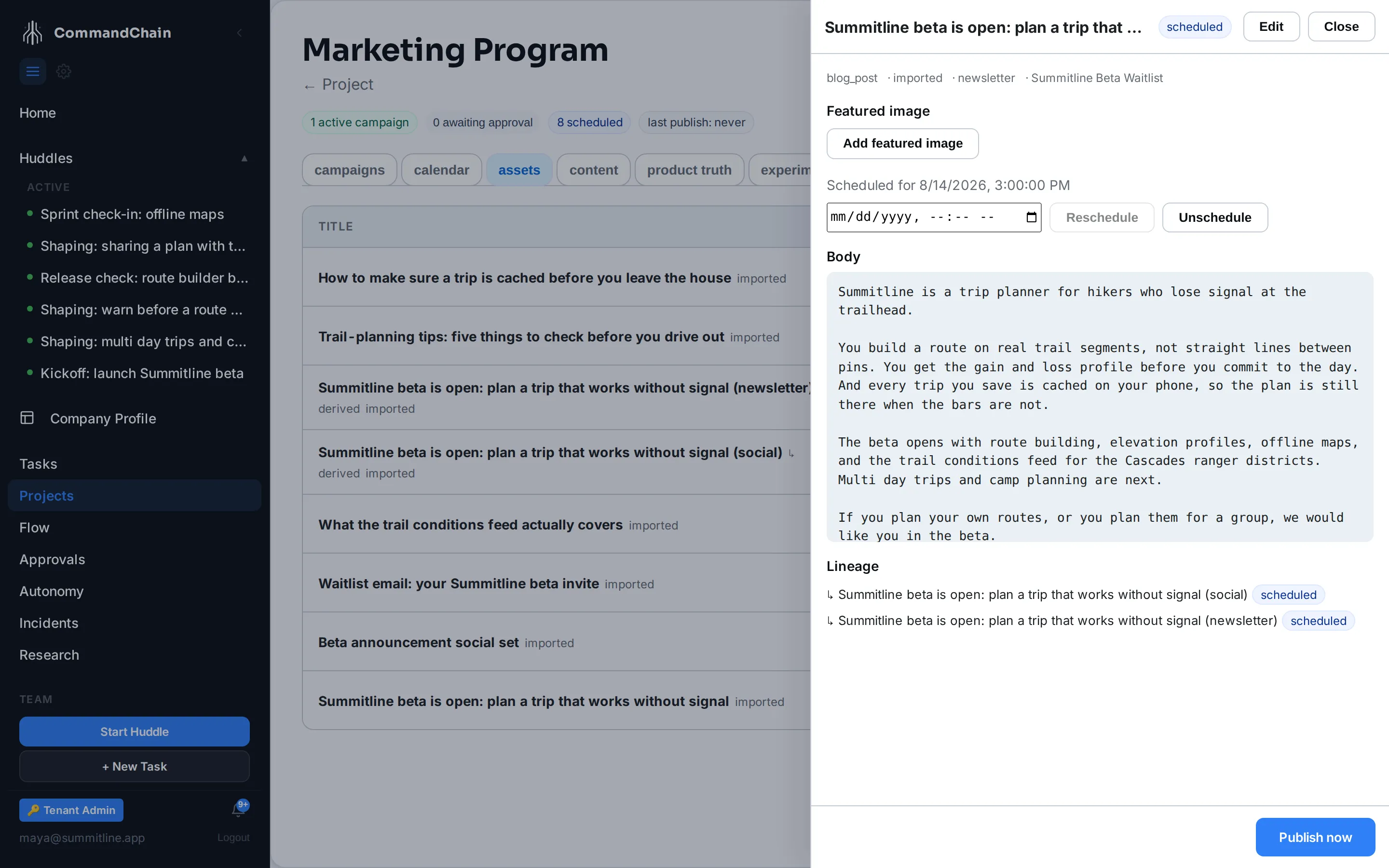
Alpenglow’s two variants are past that first step: both have been placed on the calendar, one and four days after the post they came from.
Follow the lineage
Section titled “Follow the lineage”Open the source asset and read the Lineage section: every asset derived from it, with its current status. Open a derived asset instead, and lineage points the other way, naming the asset it came from and how it was derived.
That is what makes a correction cheap. When the announcement turns out to overstate something, the family tree tells you exactly which posts repeat it.
Publish one
Section titled “Publish one”Publish now in the drawer runs the full gate: brand-safety lint first, then the autonomy level for that channel’s action class. What comes back is one of three things:
- blocked by lint. A banned phrase or a prohibited claim. Fix the content and retry. This stops a publish at every autonomy level.
- queued for approval. The default. The request is now in your approvals queue carrying the exact payload that will be sent.
- published. Only at a raised autonomy level, and only through an active binding.
Assets as experiment arms
Section titled “Assets as experiment arms”An asset can serve as one arm of an experiment: two variants of the same message, published side by side, with one declared metric deciding between them. Once an asset is bound as an arm, its collected metrics are tagged with the experiment and arm they belong to, so the comparison reads from clean per-arm numbers. Nothing else about the asset changes; it publishes through the same lint and the same approval as any other.
Next steps
Section titled “Next steps”- Plan the content calendar: giving an asset a date.
- Product truth: what a draft is allowed to claim.
- Run marketing experiments: letting two variants compete.
- Autonomy for marketing actions: what decides between queued and published.