

Review marketing proposals
A marketing proposal is how anything other than you changes what your agents say. This queue is the only door, and it is worth the minute it costs to read one properly.
Open the queue
Section titled “Open the queue”Go to Company Profile and choose the Marketing tab.
Filter by status (pending, accepted, rejected) and by scope:
- Company proposals change a field on your company profile.
- Project proposals change a field on one project’s marketing context.
The filter for source task narrows to proposals raised out of one piece of work, which is how you answer “what did that campaign teach us” in one query.
Where they come from
Section titled “Where they come from”- The weekly review. It reads your current strategy, the evidence collected from metrics, and the raw numbers, and drafts at most three proposals per project per run. Inconclusive data produces none.
- An agent that learned something. A conversation, a huddle, or a piece of work that contradicts what the strategy says.
- A teammate. Everyone can submit a proposal from the project’s Positioning tab; only administrators can save a change directly.
Read one
Section titled “Read one”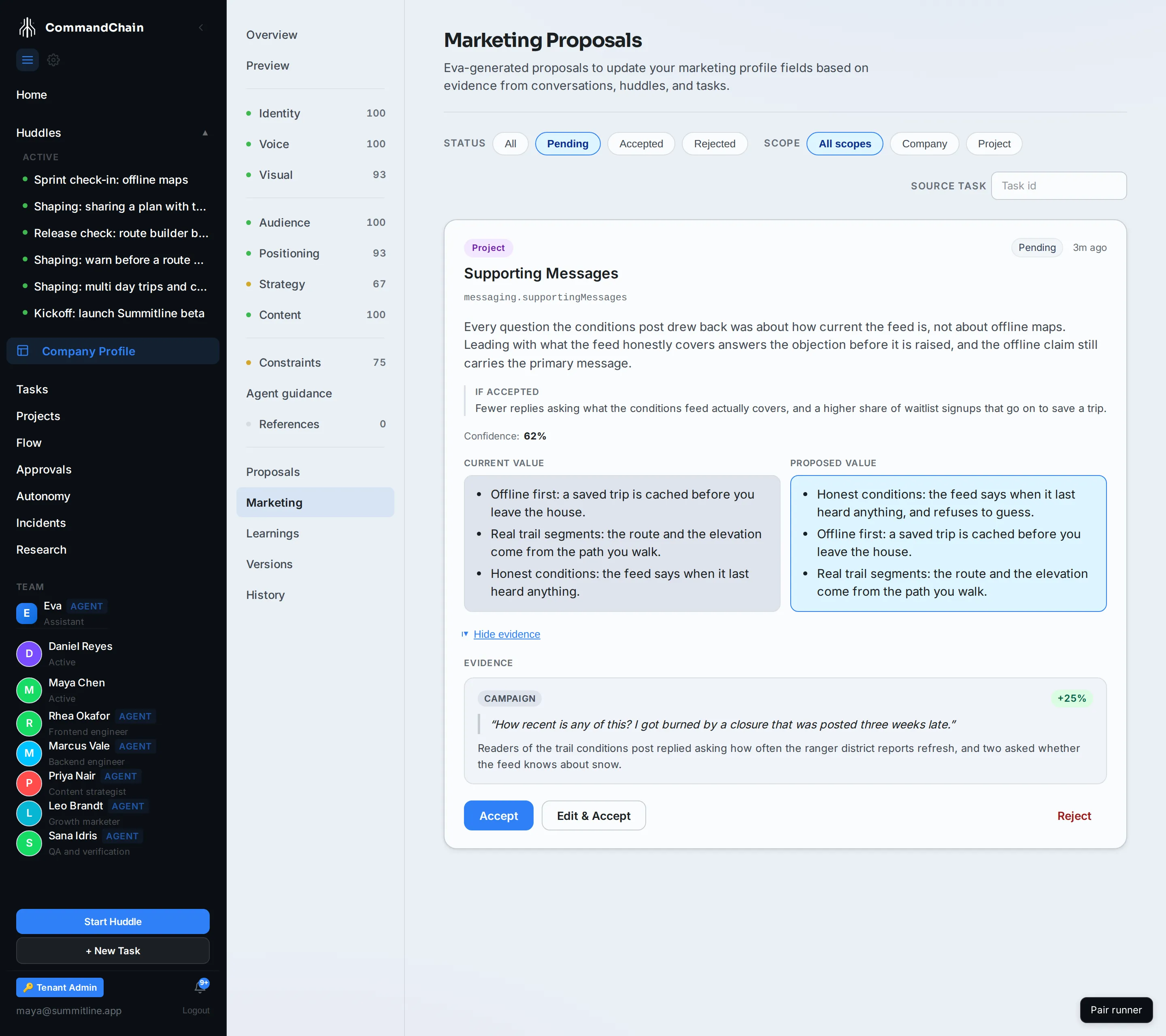
A proposal carries five things, and each one answers a different question.
| On the card | The question it answers |
|---|---|
| The field | What exactly changes, by name |
| The reason | Why the proposer thinks so |
| If accepted | What should happen as a result. This is the claim you can check later |
| Confidence | How sure the proposer is. Low confidence usually means it contradicts something already in the strategy |
| Current and proposed value | Side by side, so the size of the change is obvious |
Show evidence opens what the reason rests on: the source, a quote where there is one, a summary, and how much it moved the proposer’s confidence.
Judge the reason and the evidence, not the wording. A well-written proposal on a bad reason is the one to reject.
Decide
Section titled “Decide”Accept applies the change and publishes a new version of the profile or project context it targets. The next draft is written with it.
Edit & Accept opens the proposed value for editing first, for when the proposer has the right idea and the wrong words. What you save is what is applied.
Reject takes a note and closes the proposal. Write the note. The next proposal on the same field is much easier to judge with your last answer beside it.
Close the loop
Section titled “Close the loop”The If accepted line is not decoration. It is the reason this queue is a learning loop rather than a suggestion box:
- Accept a proposal, and note what it said should improve.
- Publish under the new strategy.
- Read the campaign metrics for the number it named.
- If it did not move, the next proposal on that field has your answer sitting next to it in the accepted history.
There is one path that does automate step 4: a proposal the weekly review is not confident enough to recommend outright can arrive as an experiment instead, testing the change before anyone adopts it. When that experiment concludes, its verdict states whether the proposal’s predicted outcome was met, missed, or unclear, with the numbers beside it. For everything else, the judgment stays in your hands, which is what the queue exists for.
Accepted learnings are the durable output of this loop; the learnings page covers where they go and how agents recall them.
Next steps
Section titled “Next steps”- Marketing context, in two layers: what an accepted proposal writes to.
- Metrics and attribution: where the evidence comes from.
- Review agent proposals: the same rule, applied to the company profile’s own fields.