

Run a content task
A content task takes one piece of content from an idea to a published, measured thing. It replaces the ordinary statuses with a pipeline, and it stops in front of you before anything reaches a channel.
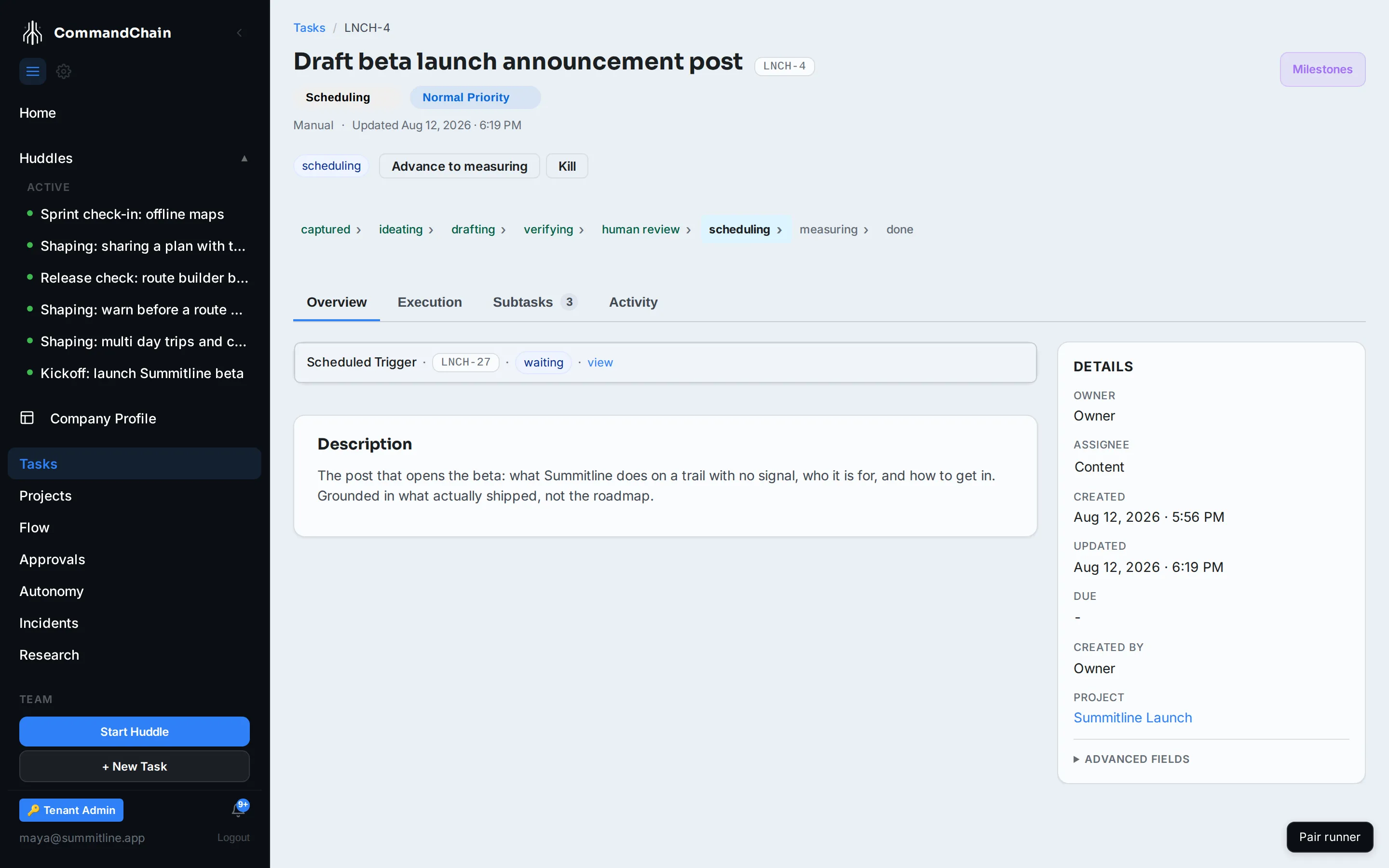
This page follows LNCH-4, the Summitline beta announcement Priya drafted.
The pipeline
Section titled “The pipeline”| Stage | What is happening | What it spawns |
|---|---|---|
| captured | The idea exists, nothing has been written | |
| ideating | Working out the angle and the proof | |
| drafting | Writing it | |
| verifying | Scored against a rubric | A verification task |
| human review | Waiting for you | An approval task |
| scheduling | Waiting for its publish time | A scheduled trigger |
| measuring | Collecting what happened after it went out | A feedback task |
| done | Measured, closed |
Each of those children is a real task carrying its parent’s project key, listed on the parent’s Subtasks tab. The content task’s Overview shows the active child inline, so you can see what it is waiting on without leaving the page.
Verification scores against a built-in rubric, Content bookmarkability: one idea a reader could repeat, every claim grounded in something that shipped, reader-first, in your voice, and complete. It is created for your workspace the first time a draft reaches that stage, and you can edit it from there like any other rubric.
The workspace draws the pipeline as a breadcrumb across the top of the task, with the current stage highlighted.
Where you come in
Section titled “Where you come in”human review is the stage that exists for you. Nothing reaches a channel without a person seeing it first, and that is not configurable away.
The approval child carries the proposed action (publish this draft) and resolves in the approvals queue. What you decide is what the content task does next:
- Approve, and the task moves to scheduling.
- Reject, and it goes back to drafting rather than dying. Sending a draft back is a normal move, not a failure.
- Let it expire, and the content task is killed with that reason recorded.
Verification behaves the same way earlier in the pipeline: passed sends the draft to you, needs revision sends it back to drafting, and failed kills it.
Killing a piece of content
Section titled “Killing a piece of content”Every stage before done can be killed. Select Kill on the task, and the workspace asks for a reason before it will let the transition through. The reason is stored on the task, so a killed piece of content says why it was killed rather than just vanishing from the calendar.
Creating one
Section titled “Creating one”Most content tasks come out of a huddle. When a room agrees to one identifiable piece a reader will see, Eva types that task as content rather than as ordinary work, and fills in the pillar, the route, and the brief from what was actually said. If the huddle never settled the angle, the brief is left out and the piece starts from its pillar alone, which is what captured means.
Eva is deliberately conservative here. A batch of five social posts, a positioning rewrite, or a website copy refresh stays an ordinary marketing task: the content pipeline is worth a human review gate for one deliverable, not for a work stream. You can retype a draft either way in review.
To create one by hand, use + New ▾, then Content, on the Tasks page. Beyond the usual title and description, a content task asks for:
- a pillar, the theme it belongs to, for example
beta launch - a route: original, repurpose, rewrite, or research and ideate
- an optional brief, the thesis in a sentence or two
Either way the task arrives at captured, and the agent assigned to it picks it up from there.
How the draft gets written
Section titled “How the draft gets written”A content task is dispatched to its agent twice: once when it is first captured, and again if verification or your review sends it back to drafting. A revision needs an agent as much as the first draft did.
The agent writes the piece as a content asset and then hands it to the task, which moves it to verifying and creates the verification child. You do not have to do anything to move it along the first half of the pipeline.
Next steps
Section titled “Next steps”- Score a verification task: the gate before your review.
- Decide an approval: the stage that waits for you.
- Manage scheduled triggers: what holds a scheduled piece until its time.