

Work the approvals queue
Approvals is where your team stops and asks. Everything in it is an agent waiting on a decision it is not allowed to take, so an empty queue means nothing is blocked on you.
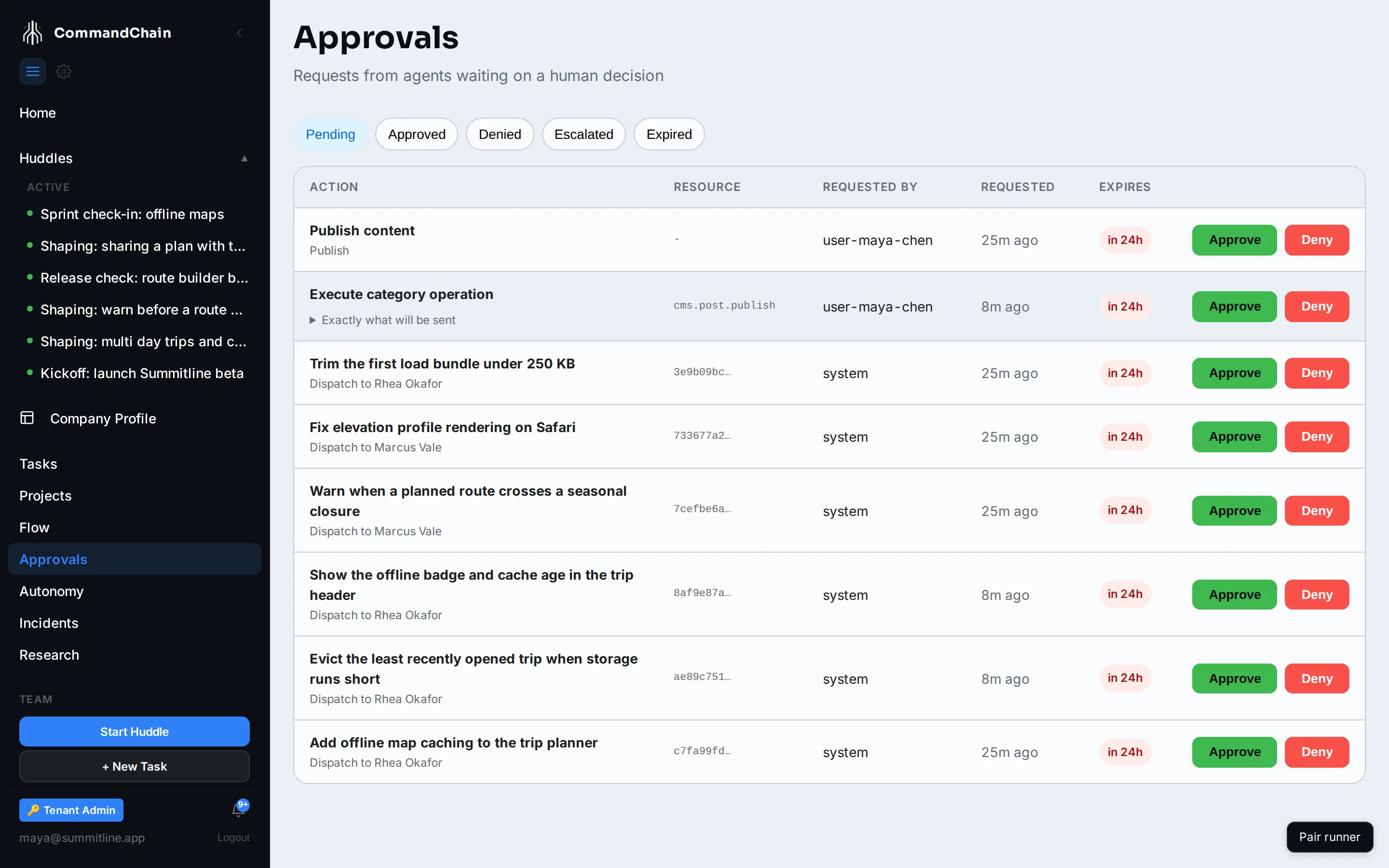
Reading a row
Section titled “Reading a row”| Column | What it tells you |
|---|---|
| Action | The subject in bold, and the sentence underneath saying exactly what will happen |
| Resource | What it acts on, shortened when it is an id |
| Requested by | system when the platform raised it, a user id when a person did |
| Requested | How long it has been waiting |
| Expires | The countdown, red inside the last day. An expired request is decided as expired, not silently approved |
Where a request has a payload, Exactly what will be sent expands to the literal body. Read it before approving anything that leaves the building.
Rows raised by a task carry a chip linking back to it, so a publish request raised by a content task takes you to the draft in one step.
The four kinds
Section titled “The four kinds”Run gates
Section titled “Run gates”The task’s title in bold, and Dispatch to the agent underneath. This is the task.dispatch action class at L1: assignment queued the work, and nothing executes until you say so.
Approve to start the run. Deny and the task stays assigned and idle, so the work is parked rather than lost.
Content publishing
Section titled “Content publishing”Publish content, raised by a content task that has reached its approval step. The payload is the copy that will go out.
Journey steps
Section titled “Journey steps”Raised when you select Propose this step on an initiative journey. Approving it enacts the move; denying it leaves the initiative where it is. Either way the decision is recorded on the journey as a gate receipt.
Autonomy graduations
Section titled “Autonomy graduations”The platform never raises an action class on its own. When a class’s track record clears the thresholds, the evaluator proposes exactly one level up and puts it here, carrying the evidence: how many actions were taken, the approval rate, and the window they were measured over.
Approving applies the raise. Denying leaves the class where it is, and the evidence keeps accumulating.
When nobody decides
Section titled “When nobody decides”Three deadlines run while a request waits, and the platform checks them every few minutes. The first applies only to a request an agent raises in the middle of a run. The other two apply to every request, including that one.
The run hold. A mid-run request holds its run for ten minutes, because the answer to it is usually minutes away. After ten minutes the run stops, saves its work on the task’s branch, and the task moves to blocked. The request stays in the queue exactly as it was. Approving it later starts a fresh run that carries on from the saved branch, so nothing is lost however long it takes to get back to it. Denying it later leaves the task open and starts nothing. Ten minutes is how long the run waits, not how long the request lives: the two windows below are counted from when the request arrived and are unchanged by it.
Escalation. After the escalation window (one hour by default) an undecided request moves to Escalated and notifies whoever it escalates to. It is still live work: an escalated request is approved or denied exactly like a pending one.
Expiry. After the expiry window (24 hours by default) an undecided request is decided as expired, and the task waiting on it moves to expired with that reason recorded. Nothing is ever silently approved.
Decide one
Section titled “Decide one”-
Filter to Pending, then Escalated. Both are live work. Approved, Denied and Expired are history.
-
Read the action sentence, and the payload if there is one.
-
Approve, or Deny with a reason. The reason is shared with whoever asked, so “not this week, the beta is open” is more useful than “no”.
The queue updates itself when an approval changes anywhere, so a tab left open does not go stale, and only the row you are acting on shows a pending state.
Fewer approvals
Section titled “Fewer approvals”Every row is a level on the autonomy ladder doing its job. A workspace at L1 for everything asks about everything. Raise a class you have watched behave, and that kind of request stops arriving. Lower one after a surprise, and it starts again.
Next steps
Section titled “Next steps”- The autonomy ladder: what decides whether something asks first.
- Review a changeset: the other queue, for code an agent wrote.
- Act on notifications: how a waiting request reaches you.