

Set environment variables and secrets
An agent building and testing your product needs the same configuration a developer does: an API token for the map tiles, a key for the conditions feed, the bucket name it writes to. A project environment is that .env, held by the project rather than by any machine.
Add an environment
Section titled “Add an environment”-
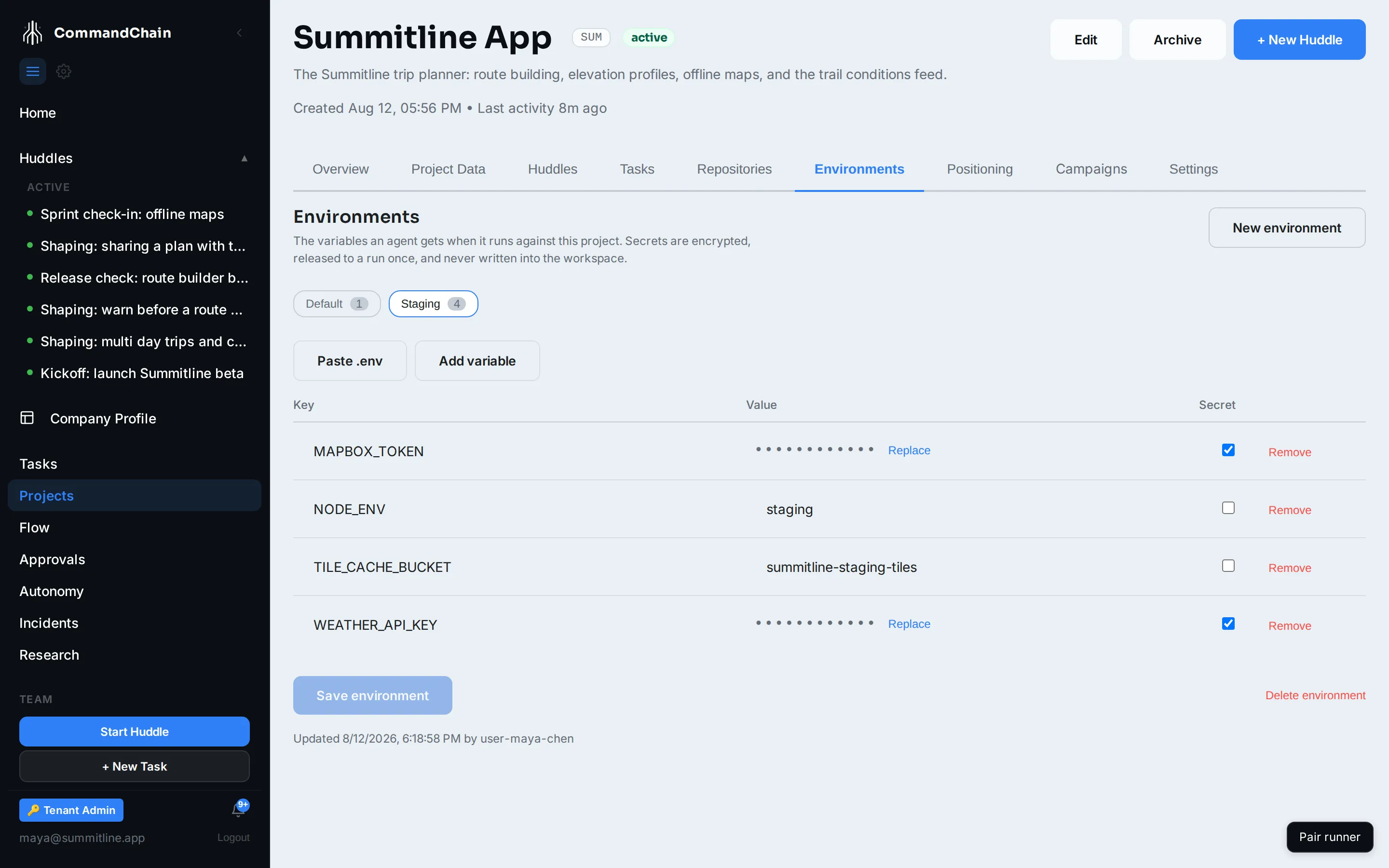
Open the project, then Environments, then New environment.
-
Give it an id and a display name. Summitline App has
staging, shown as Staging. -
Paste .env content and Import. Every
KEY=valueline becomes a row, and keys that look like credentials are pre-ticked as secret. Or Add variable for one at a time. -
Check the Secret column on every row. It is the only decision on this screen that matters, and you are confirming a guess.
-
Save environment.
Secrets are write-only
Section titled “Secrets are write-only”A row marked secret is encrypted on the way in and never comes back out to you. The list route returns secret rows by name only, so the screen has no value to render and shows a mask instead.
That means there is no “reveal” control, and no way to copy a stored secret back out of CommandChain. If you have lost the value, get it from wherever it came from and Replace the row.
Leaving a masked row alone keeps the stored value: the browser sends the row without a value, which the API reads as “keep it”. Only a row you actually type into is replaced.
Released to a run once, and once only
Section titled “Released to a run once, and once only”The environment is not copied onto any machine. It is released to a single attempt, at the moment that attempt starts, over an attempt-scoped token:
- One-time. The release is stamped with an atomic compare-and-set before any secret is decrypted, so of two simultaneous fetches exactly one succeeds and the second is refused. A retry gets its own single release.
- All or nothing. A missing environment, or a secret that no longer resolves, fails the release outright. An agent is never started with a quietly partial
.env, because a half-configured build fails in ways that look like your code. - Silent to the logs. Neither the values nor the key names reach the log stream. The audit record carries the key names and the count, so you can see what was handed over without the platform ever storing what.
- Masked in output. The release says which keys hold secret material, and the runner masks those values in its logs and callbacks. Plain values such as
NODE_ENV=stagingare left readable, because blacking out the word “staging” everywhere would help nobody.
Treat the second fetch being refused as the feature it is, not as an error: it means a released environment cannot be replayed.
Deleting one
Section titled “Deleting one”Delete environment destroys its secrets. The next run that needs them fails rather than starting without them, which is why the confirmation says so.
Next steps
Section titled “Next steps”- Connect repositories: the code these variables configure.
- Runs and attempts: what an attempt is, and why the release is scoped to one.
- The security model: where this sits in the wider boundary.