

The autonomy ladder
Autonomy is the answer to one question: when an agent is about to do something in the real world, does it ask you first? CommandChain answers that question per kind of action, not per agent and not once for the whole product.
Three levels
Section titled “Three levels”flowchart TB L1["L1 approve each action<br/>agent proposes, you approve"] L2["L2 act, then review<br/>agent acts, you review after"] L3["L3 act within policy<br/>agent acts, exceptions surface"] L1 -- "you approve a graduation" --> L2 L2 -- "you approve a graduation" --> L3 L3 -- "incident" --> L2 L2 -- "incident" --> L1
- L1, approve each action. The agent prepares the action and stops. An approval lands in your queue, and nothing happens until you decide.
- L2, act then review. The agent acts immediately, a review task is created after the fact, and you are notified. You see everything, just not beforehand.
- L3, act within policy. The agent acts, and only exceptions and threshold breaches come to you.
Levels are per action class
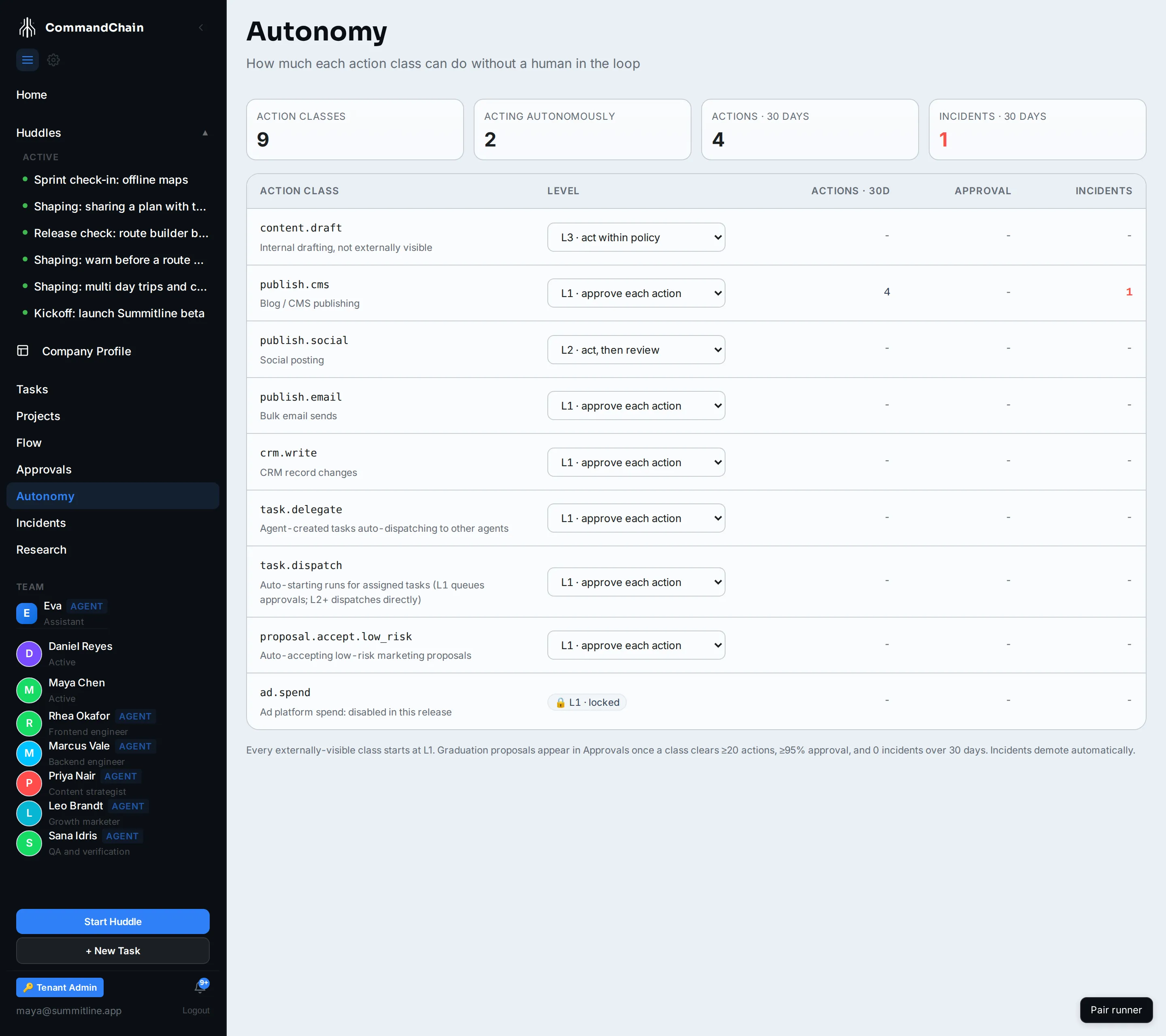
Section titled “Levels are per action class”The unit is an action class, a kind of externally visible act rather than a feature. Drafting content internally is not the same risk as posting to a social account, so they carry separate levels.
| Action class | What it covers |
|---|---|
content.draft | Internal drafting, not visible outside your workspace |
publish.cms | Publishing to a site or content system |
publish.social | Posting to a social account |
publish.email | Sending bulk email |
crm.write | Writing to customer records |
webhook.emit | Posting to a webhook endpoint you connected |
task.dispatch | Starting a run when a task is assigned |
task.delegate | Agent-created tasks handing work to other agents |
code.merge | Merging a delivery branch after its ship verification |
proposal.accept.low_risk | Accepting low-risk proposals without you |
ad.spend | Spending money on advertising |
Everything externally visible starts at L1. Internal drafting starts higher, because a draft nobody outside your workspace can see is not an action you need to pre-approve. The action class reference lists every class with the level it ships at.
A level applies across your whole workspace by default. There is one ladder, and every project answers to it unless you say otherwise.
Overriding a level for one project
Section titled “Overriding a level for one project”Some projects deserve more room than others: an internal blog nobody outside the company reads is not the customer-facing site, even though publishing to either is publish.cms. So a level can be overridden for a single project, and the override wins wherever the work names that project. Work that names no project keeps using the workspace level.
An override goes either way. It can raise a class on a project you trust, or hold one down on a project you want watched. It cannot raise a hard-locked class, so ad.spend stays at L1 on every project, and it does not change the track record, which is still kept per class for the workspace.
Overrides are set through the API rather than on the Autonomy page, which shows the workspace level for each class.
What can never be raised
Section titled “What can never be raised”ad.spend is hard-locked at L1. It cannot be raised from the page, from the API, or by any graduation, and the refusal is in the code rather than in configuration. No agent spends advertising money without a person approving that specific spend.
Raising a level is earned, and it is yours to grant
Section titled “Raising a level is earned, and it is yours to grant”The system never promotes itself. What it does is watch the track record for each action class and, when the evidence is there, ask you.
A graduation proposal is only raised when the record clears every bar: at least 20 actions in the class, an approval rate of 95 percent or better, no incidents, all within a 30 day window. The proposal arrives in your approvals queue with that evidence attached, and it is a proposal. Declining it changes nothing.
You can also raise a level yourself, without waiting for a proposal, and you can lower any level at any time. Lowering takes effect immediately.
Demotion is automatic
Section titled “Demotion is automatic”Trust moves in both directions, and only one direction is automatic.
- An incident demotes the class one level. Something went wrong, so the class drops a rung without waiting for anyone to intervene.
- A burst of automatic actions falls back to L1. If a class exceeds its allowed number of unattended actions in a day, it reverts to asking you and records an incident. The default limit is five per class per day.
The record behind all of this is kept per action class: what ran at which level, and what was approved, rejected, or became an incident. That is what a graduation proposal quotes, and it is on the Autonomy page.
Next steps
Section titled “Next steps”- Budgets: the other limit, expressed in money rather than permission.
- Task types: approval tasks, which are what an L1 action becomes.
- Using CommandChain: the guides for the approvals queue and setting levels.