

Autonomy for marketing actions
Publishing is the moment marketing touches the outside world, so it is the moment the autonomy ladder matters most. Levels are set per kind of action, for the whole workspace, on the Autonomy page.
The classes marketing uses
Section titled “The classes marketing uses”| Action class | Covers | Ships at |
|---|---|---|
content.draft | Drafting inside your workspace, not visible outside it | L3 |
publish.cms | Publishing to a site or content system | L1 |
publish.social | Posting to a social account | L1 |
publish.email | Sending bulk email | L1 |
proposal.accept.low_risk | Accepting low-risk marketing proposals without you | L1 |
ad.spend | Spending money on advertising | L1, locked |
Drafting starts high because a draft nobody outside your workspace can see is not an action you need to pre-approve. Everything externally visible starts at L1.
publish.social is worth one more thought before you raise it. Some platforms charge for the call: posting to X spends from the credit on your own X account, cents at a time, and at L2 or L3 that happens without you approving each one. What bounds it is the guard you already have, the number of publishes a class may run unattended in a day, so set that deliberately before raising the level. This is not ad.spend, which stays a separate class and stays locked. What each platform charges is on connect social platforms.
Reading the track record
Section titled “Reading the track record”The Autonomy page counts the last 30 days per class.
- Actions is how many actions of that class ran, at any level.
- Approval is the share of decided approvals that were approved. It reads as a dash until at least one approval has actually been decided.
- Incidents is how many times the class did something that opened an incident.
The four counters above the table are the workspace view: how many classes exist, how many are acting without you, how many actions ran in the window, and how many incidents there were.
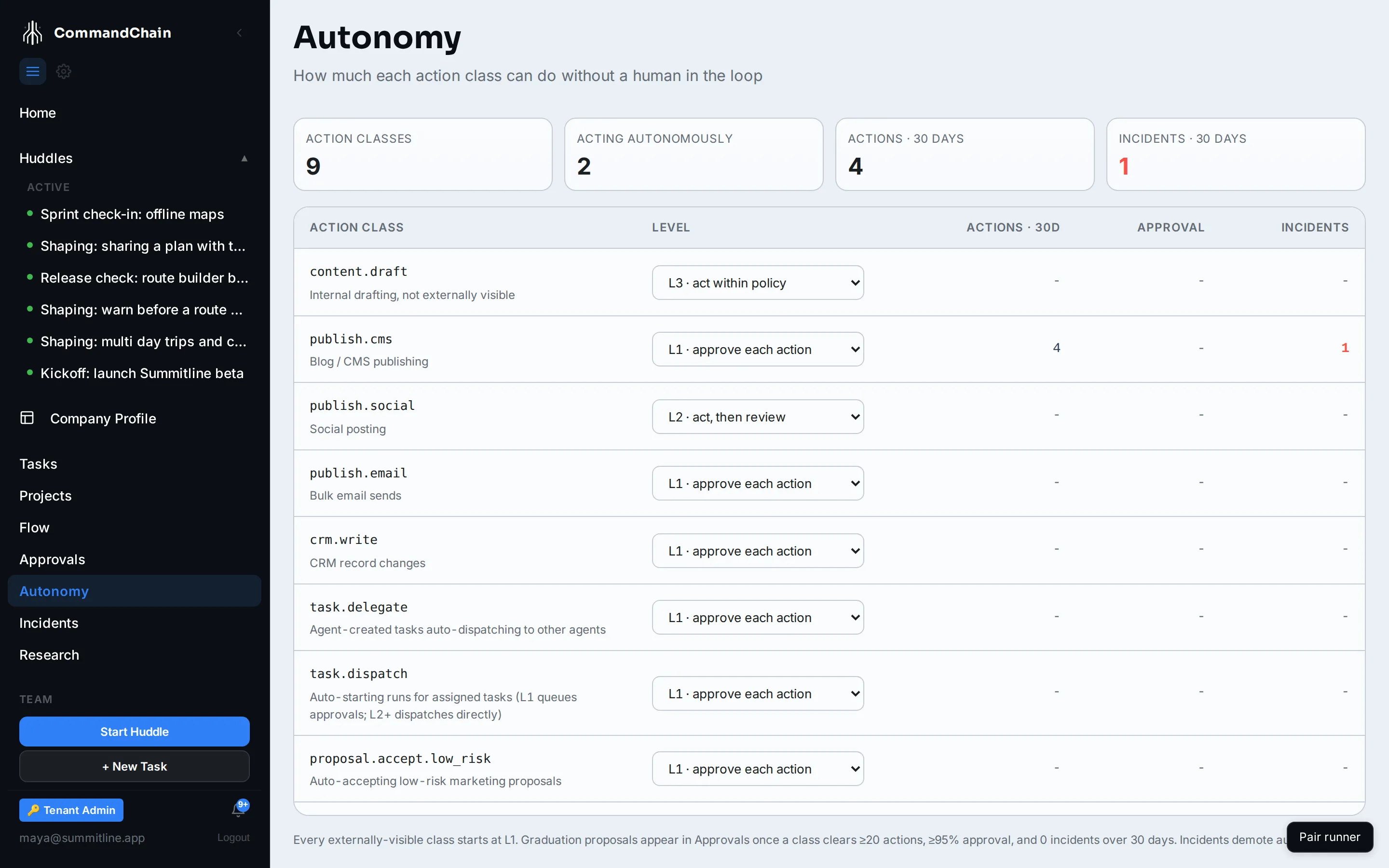
Alpenglow’s record is worth reading closely. publish.cms shows four actions and one incident, and sits at L1. It was at L2, it published three times, the fourth breached the daily guard, and the class was demoted automatically. That is the ladder working, and it is the shape most track records eventually take.
The approval column reads as a dash for it, which is not a gap in the data. It counts decided approvals, and the publish the guard held is still sitting in the queue undecided.
Raising a level
Section titled “Raising a level”Two paths, and both end with you.
A graduation proposal. When a class clears every bar in the trailing 30 days, a proposal appears in your approvals queue asking to raise it one rung, with the record attached. The bars are: at least 20 actions, an approval rate of 95 percent or better, no incidents, and nothing reverted. The system never raises a level on its own, and declining changes nothing.
Your own decision. Change the level in the dropdown on the row. There is no waiting period, and you can lower any level the same way, with immediate effect.
Losing one
Section titled “Losing one”Demotion is the only automatic direction.
- An incident drops the class one rung.
- A burst falls back to L1. More than five unattended actions in a class in one day reverts it to asking you, records an incident, and demotes it.
A working order
Section titled “A working order”- Leave everything at L1 until you have decided a dozen publishes by hand. That is what builds a record worth reading.
- Raise the one channel you check most often, usually social, and leave the rest.
- Read the review task after each L2 action for the first week.
- When something goes out that should not have, lower the level the same day. It is one dropdown, and the record keeps the reason.
Next steps
Section titled “Next steps”- The autonomy ladder: all three levels, in full.
- Incidents and autonomy demotion: what a demotion leaves behind.
- Work the approvals queue: where an L1 publish and a graduation both land.