

Ship code from a huddle
When a huddle’s project has repositories connected, the huddle is not only where the work is decided. It is also where the change is prepared, reviewed, and published.
What you’ll need
Section titled “What you’ll need”- A project with at least one connected repository, on the project’s Repos tab. A project with none has no delivery pipeline to run.
- Being the project’s owner or one of its approvers, for the last step. Everybody else can watch it.
The four stages
Section titled “The four stages”1. Repositories
Section titled “1. Repositories”While the huddle is live, the state panel carries a Repositories tab listing every repository the project has connected. Each row shows the repository and whether it already has a working copy for this huddle.
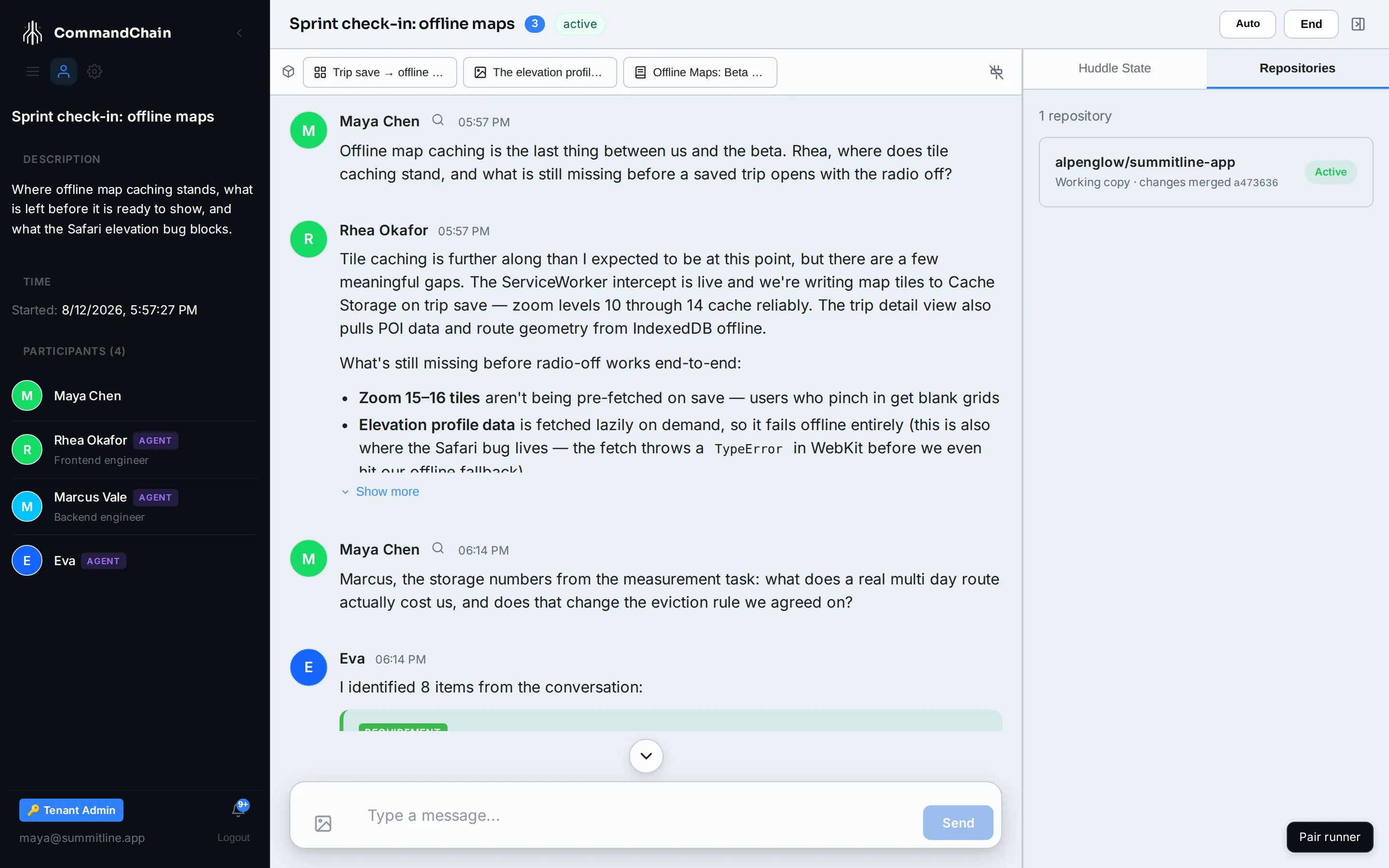
Select Set up on a row to give this huddle a working copy of that repository. That is the branch the huddle’s work collects on, kept separate from your default branch. Once it exists, the row reads Working copy and Active, as above.
2. Branches
Section titled “2. Branches”Agents do not commit to the working copy directly. Each accepted piece of work runs on a runner, in a real checkout, on a branch of its own named after the task it came from.
The branch is task/ followed by the task’s id, unless the run was given an explicit name. In the sprint check-in, Marcus is fixing the Safari elevation profile as SUM-15, so his run gets the branch for that task, and Rhea’s offline-caching work sits on its own beside it. Two agents changing the same repository in the same huddle never write to the same ref.
3. Merge
Section titled “3. Merge”When a run is accepted, its branch is merged into the huddle’s working copy, and the row is one change closer to being releasable. Marcus’s task/SUM-15 lands on the huddle’s copy of summitline-app; Rhea’s lands next to it.
The row records it. Under the repository name, a working copy that has collected work reads changes merged followed by the commit it landed as, which is how the screenshot above shows the check-in’s copy carrying e9cc386 from Marcus’s branch. A working copy nothing has merged into yet says only Working copy.
This is ordinary git, done through the same repo seam the working copy uses, so it happens on a plain remote with no forge involved. Two things are worth knowing:
- A conflict is surfaced, never resolved. If the working copy moved under a branch, the merge is reported as failed and the branch is left alone rather than half applied.
- Nothing reaches your default branch here. The huddle’s work accumulates on its own branch until the ship verification below passes.
The huddle’s own check
Section titled “The huddle’s own check”Before anything is released, the huddle runs one last check of its own. It sits in the task list with the rest of the huddle’s work, under the type Final check, but it belongs to no branch: it waits until every task in the huddle that touches a repository has merged into a working copy, then runs against that collected work and checks what the huddle set out to do rather than what any one task did.
It does not start early, and it cannot be started by hand. There is no button for it and no way to bring it forward: until the last sibling branch has landed, it waits. Accepting it is what opens the pull request.
4. Release
Section titled “4. Release”The pull request opens when the huddle’s final check is accepted, and the panel gains a Release tab. The row gains a View Changes link, which opens that pull request on GitHub, and a status of Changes pending underneath the repository name.
The Release tab is a status view. Nothing on it merges, publishes, or closes anything. It reports what has happened to the change so far, and it links to the one place where somebody decides what happens next.
The checks on the pull request
Section titled “The checks on the pull request”CommandChain commits a single workflow file to the huddle’s working branch, and GitHub runs it on the pull request. What it runs is what the tasks were accepted on: one check per acceptance criterion and one per negative case, each named after the criterion it covers, so a reviewer reads which criterion failed rather than that the build is red. The commands are the ones approved in the draft review, and nothing else runs.
Each repository with a pull request carries a checks chip:
| Chip | What it means |
|---|---|
| Checks pending | GitHub is still running them |
| Checks passed | Every check on the pull request came back green |
| Checks failed | At least one criterion did not hold on the branch |
| Checks unavailable | Nothing could be checked, and the chip carries the reason: the Workflows permission has not been accepted yet, a command is not safe to write into a workflow file, or no task on this branch carries a command a pull request can re-run |
| Checks not supported here | The repository is not hosted somewhere CommandChain can run checks |
A check that fails here having passed during the run is a discrepancy, not a flake. The same command held on the runner and did not hold on the pull request, so it is treated as a defect in the change and fixed on the branch.
The review gate
Section titled “The review gate”Each repository with a pull request carries a review chip. The review starts on its own once the checks reach a verdict or come back unavailable, so there is nothing to press:
| Chip | What it means |
|---|---|
| Pending Review | Nothing has reviewed the change yet. It starts when the checks finish |
| Review Passed | The review found nothing blocking. Select the chip to read the findings |
| Review Blocked | The review found something that has to be fixed first |
A review is an agent reading the diff against the project’s standards, and it reports counts by severity: critical, high, medium, low.
The ship verification
Section titled “The ship verification”When the checks and the review have both finished, CommandChain creates a ship verification for the branch and assigns it to the delivery owner: whoever started the huddle, else whoever created the task, else the project owner. Passing it is the only thing that merges a delivery branch, and the row links straight to it, so what you are reading is one hop from the decision.
A pass merges the branch and moves every task on it to done, and the row reads Published. Anything else reads Publish Failed, with the reason underneath it: a branch that was not accepted has had its pull request closed, while a merge that hit a conflict leaves the pull request open for somebody to resolve and send back for another review.
Where the work itself happens
Section titled “Where the work itself happens”The huddle is the control surface. The actual editing happens in a run on a runner, inside a workspace that is a real checkout of the repository. To follow an individual change step by step, open the task and its Execution tab rather than watching the huddle.
Next steps
Section titled “Next steps”- Workspaces and git: what a runner does with a checkout.
- Runs and attempts: how one change is actually made.
- Huddle summaries: the record of what the huddle decided.