

Query the audit log
Settings → Governance → Audit Log holds every governance action in your workspace: who did what, to what, and how it turned out. It needs the view_audit_log permission.
Narrow it first
Section titled “Narrow it first”The whole log is not a useful view. The filters across the top are:
- Time, from the last hour to the last 30 days.
- Type, grouped by area (Authentication, Users, Tasks, Approvals, Tokens, Integrations, Huddles, and so on).
- Actor, a user or agent id.
- Resource type and Resource ID together, which is the narrowest and most useful pair.
Every filter is in the URL, so a narrowed view is a link you can paste to somebody. ?resourceType=task&resourceId=<id> is the whole history of one task and nothing else.
The four counters above the table are shortcuts, not statistics: clicking Denials, Failures, or Security filters the rows you already have to that kind.
Read one action
Section titled “Read one action”Alpenglow’s launch announcement needed a human decision before it went out, and LNCH-10 is the approval that carried it. Filtered to that task, the log holds exactly two rows: the approval being created, and Maya deciding it.
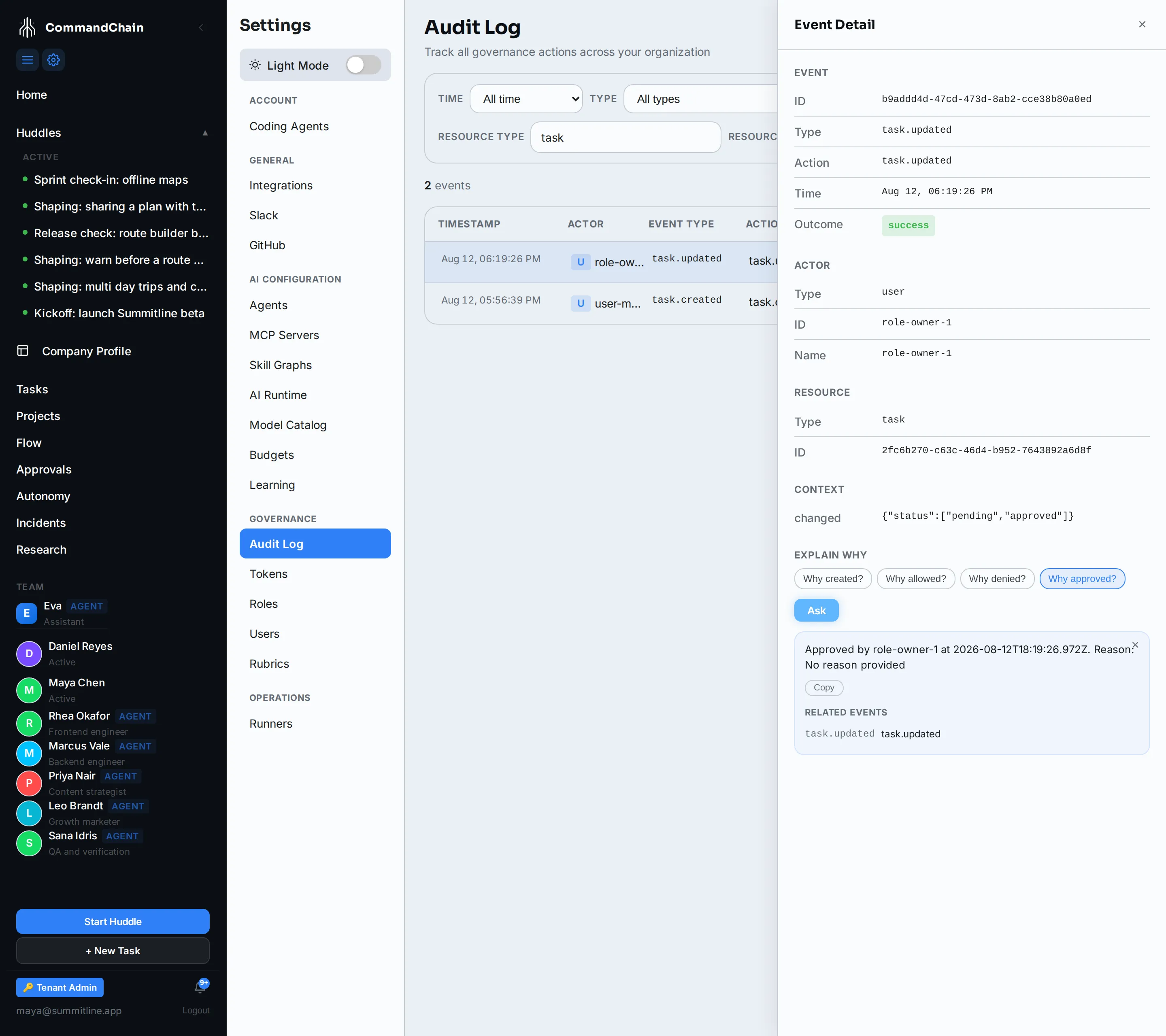
Selecting a row opens the detail panel. Worth knowing what each block is:
- Event is the action itself: type, time, and outcome. For a decision, the Context block carries what changed, here
status: pending → approved. - Actor is who acted. Task actions record the acting role rather than the person, because work is assigned to roles and approvals route to them.
- Resource is what they acted on.
- Related Events (Trace) links the rows that share a trace id, so a chain of actions from one request stays together.
Explain why
Section titled “Explain why”The Explain Why block answers four questions in prose, with the events behind the answer attached:
| Question | Answers from |
|---|---|
| Why created? | The creation event, its actor, and its reason |
| Why allowed? | The most recent allow decision |
| Why denied? | The most recent deny decision |
| Why approved? | The approval, and who granted it |
Pick a question and click Ask. The trace under the answer is clickable: selecting a related event moves the panel to it, which is how you walk backwards from an outcome to the thing that caused it.
The answer is assembled from the recorded events, not written by a model, so it is as complete as the trail and no more.
Export
Section titled “Export”The Export dropdown writes the current filtered view to a file:
- JSON for a human or a script.
- JSONL for log pipelines that read one object per line.
- CEF for a SIEM.
Export honours the filters, so narrow first and export second.
What is recorded
Section titled “What is recorded”The log covers governance actions rather than every keystroke: sign-ins, member and permission changes, task lifecycle including decisions, token issue and revoke, integration and credential changes, huddles, approvals, and tenant-level changes. Reading a page is not an event; changing something is.
Next steps
Section titled “Next steps”- Permission tokens: every issue and revoke lands here.
- Roles and permissions: permission changes are audited too.
- Work the approvals queue: where the decisions in this log are made.