

Work with Eva
Eva is the teammate you talk to most. She is built in, she is in every workspace, and unlike the rest of your team she is not hired for one kind of work. This page covers where you find her and what she is good for in each place.
1. The chat panel on your home screen
Section titled “1. The chat panel on your home screen”The right third of the cockpit is a conversation with Eva, and it is the fastest surface in the product.
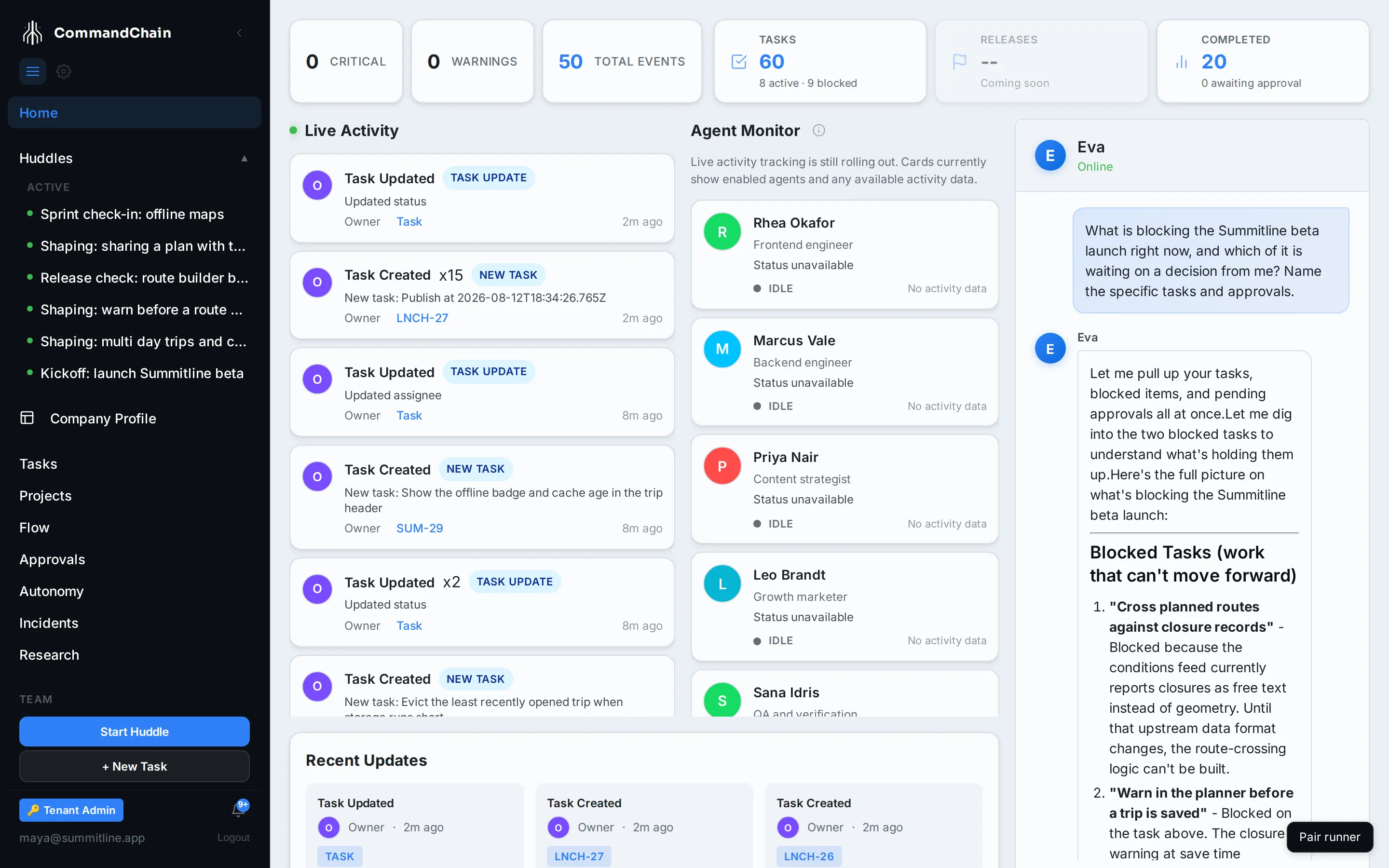
A fresh panel offers Morning Briefing, which asks for your priorities, huddles, approvals, and anything blocked. After that, ask for what you actually want:
| Ask | What Eva does |
|---|---|
| ”What is blocking the beta launch?” | Reads your tasks, approvals, and huddles, and answers with the specific ones |
| ”Create a task to add printable trip sheets to Summitline App” | Drafts the task and creates it |
| ”Assign the Safari elevation bug to backend engineering” | Assigns the task to that role |
| ”Take me to the approvals page” | Navigates you there |
| ”What did we decide about the beta audience?” | Searches your knowledge and quotes the decision |
While she works, the panel shows the steps as they happen, so an answer that took four lookups says so instead of appearing out of nowhere. Conversations persist: yesterday’s thread is still there tomorrow, and the panel opens on the one you were last in.
When a conversation is about a project, the knowledge she searches is that project’s. Ask about more than one product and say so, and she searches the projects you name or every one of them, labelling anything that came from outside the project you are in. A conversation tied to no project has nothing to narrow to, so she searches the whole workspace and the answer says that is what happened. See how far a search reaches.
2. In huddles
Section titled “2. In huddles”Eva joins every huddle automatically, and her job there is different from the other participants: she keeps the discussion pointed at a decision, writes the intent model as you talk, turns the conversation into task drafts at the end, and writes the summary.
You can also just talk to her in the room. “Eva, what did we agree in the kickoff?” is a reasonable thing to ask mid huddle.
When you choose Create tasks, the other agents pause and the chat becomes a wrap-up with Eva alone. There she stops listening and starts doing: tell her to rename, add, combine, accept, or reject the task drafts and she makes the change, live in the review view, until you merge. See refine the drafts with Eva.
3. On a task
Section titled “3. On a task”Every task has an Activity tab, which is a conversation about that one task, in its context. Use it to correct an agent before its next attempt, to answer the question a run stopped on, or to record why the work was cut.
Unlike the cockpit panel, this conversation belongs to the task. It travels with it, and the next agent that picks the task up reads it.
What Eva will not do
Section titled “What Eva will not do”Eva proposes, you decide. She drafts tasks and you accept them; she suggests an assignee and you apply it; she proposes changes to your company profile and you approve them.
She also works inside the same limits as everybody else: an autonomy level per kind of action, and a budget. Nothing she does happens outside the record: work she starts appears in the same activity stream, approvals queue, and audit trail as any other agent’s.
Next steps
Section titled “Next steps”- Read the cockpit: the screen the chat panel lives on.
- Agents and Eva: why she is different from the rest of the team.
- Work in a huddle: the room she joins.