

Run a campaign
A campaign is one coordinated effort with an objective, an audience, and channels. Workflows run on it, assets gather under it, and metrics roll up to it.
Create one
Section titled “Create one”- On the marketing home, stay on the campaigns view and click + New Campaign.
- Give it a name a teammate would recognize, for example “Summitline Beta Waitlist”.
- Write the objective as the outcome, not the activity. Alpenglow’s reads: fill the beta with hikers who will plan a real trip in the first week, not with people collecting invites.
- Describe the audience in a sentence, and list the channels you will actually use.
- Click Create campaign.
A new campaign starts in draft. Set it to active when work begins on it: that transition is what records the campaign as launched in metrics.
Run a workflow on it
Section titled “Run a workflow on it”A workflow is a reusable playbook that expands into a plan of agent tasks with dependencies. Three templates ship:
| Template | What it does |
|---|---|
| Launch Announcement | Digest product truth, draft the announcement, lint and publish it, atomize it into social posts, schedule them, measure |
| Content Atomization | Turn one asset into channel-native variants, review each, schedule |
| Positioning Sprint | Research, then propose ICP and positioning changes, then refresh messaging. Everything lands as proposals |
On the campaign page, choose a template and click Run workflow.
Review the plan before it exists
Section titled “Review the plan before it exists”The instance arrives in pending review, and this is the point of the stage: no task has been created yet. Every step’s title is editable in place. Change one, and a Save edits button appears next to Launch.
Read the plan for two things: whether the steps are the work you actually want, and whether the dependency chain is right. Each step names the agent role it wants and the step it waits for.
Launch it
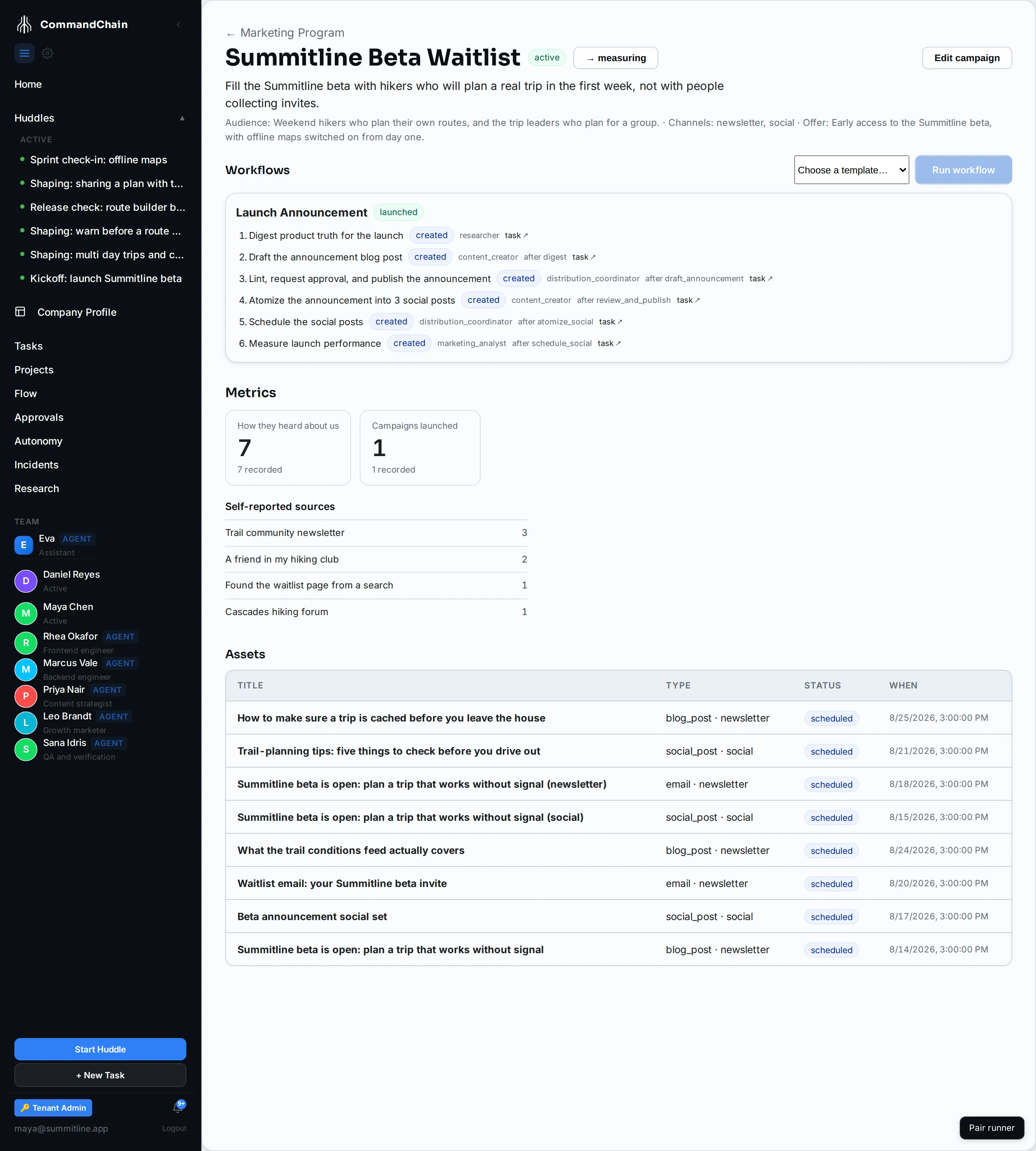
Section titled “Launch it”Click Launch. Every step becomes a real task in the project:
- steps with no dependency open immediately and are announced for dispatch,
- every other step is created blocked, and unblocks when the step it waits for completes.
The card then shows each step with a created chip and a task link through to the task itself. Publishing steps still go through the autonomy gate when they run, so launching a workflow is not a decision to publish.
Monitor it
Section titled “Monitor it”The campaign page is the monitoring view. Under the workflow card:
- Metrics is what the loop has measured for this campaign so far.
- How they heard about us is where you record a self-reported answer against this campaign. It is the one number nobody can collect for you. See metrics and attribution.
- Assets lists everything created under it, with status and scheduled or published date. Click a row to open the asset drawer.
Next steps
Section titled “Next steps”- Work with content assets: what the drafting steps produce.
- Metrics and attribution: reading the numbers under the workflow.
- Autonomy for marketing actions: what happens when a publish step runs.