

Work in a meeting
A meeting is a room, not a form. This page is a tour of it, using the live sprint check-in on offline maps.
The header
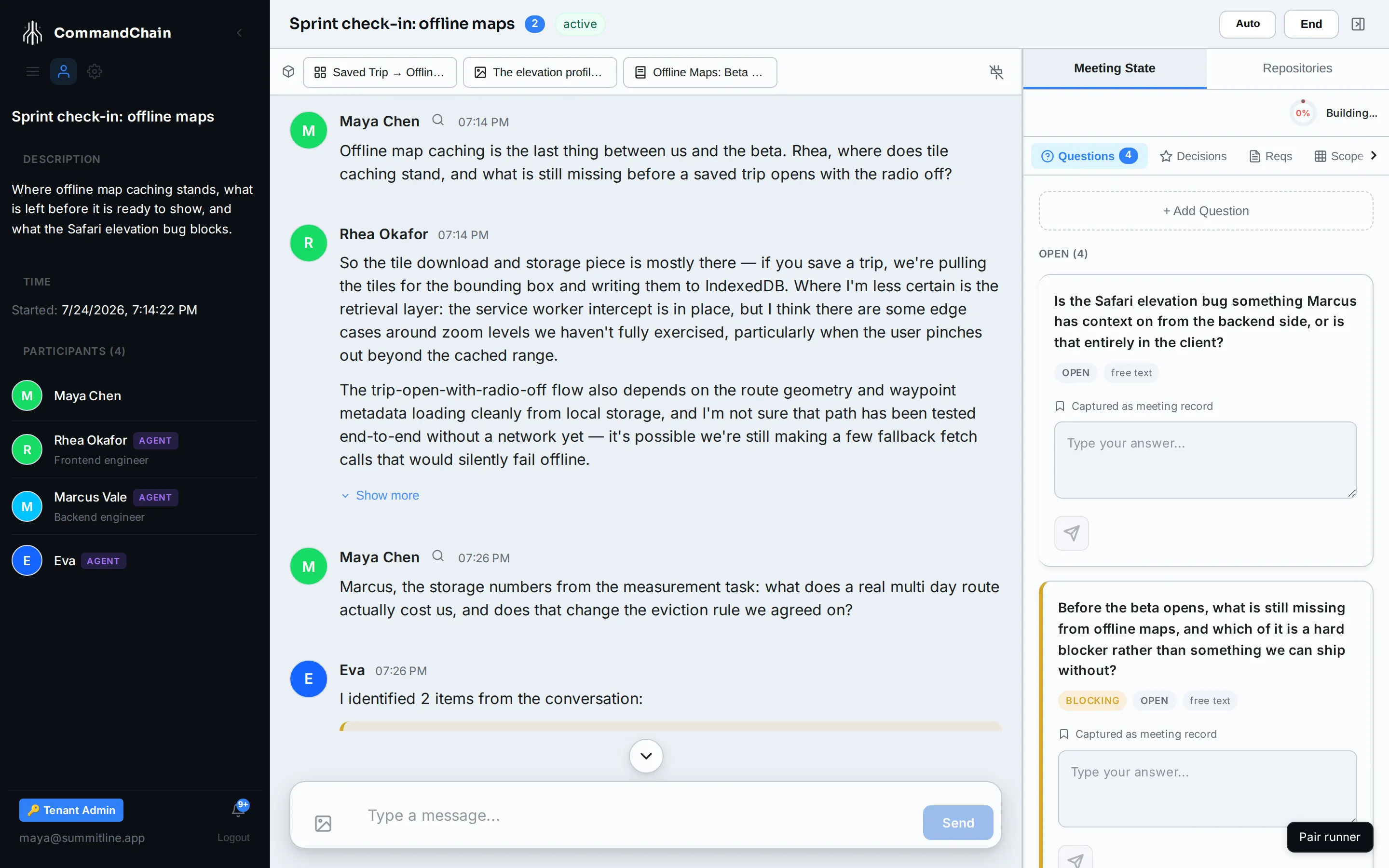
Section titled “The header”The title, the participant count, and the meeting’s status sit on the left. Selecting the title opens topics.
On the right are only the controls that apply right now:
| Control | When it appears | What it does |
|---|---|---|
| Start | The meeting is scheduled and has not begun | Opens the room |
| Auto | The meeting is live and has two or more agents besides Eva | Lets the agents answer each other for a set number of turns |
| End | The meeting is live | Ends it, and starts the drafts and summary |
| Review Drafts | The meeting is waiting on your review | Reopens the drafts carousel |
| Summary | The meeting is over | Opens the written summary |
The icon at the far right collapses the state panel when you want the conversation full width.
The chat stream
Section titled “The chat stream”The conversation, oldest first, with your messages and your agents’ replies interleaved. Each agent message carries the agent’s name and avatar, so a room of five is still readable.
- Send posts your message. Enter sends, Shift+Enter starts a new line.
- The image button attaches a picture to the conversation. Pick the file, add a description, and it lands in the stream and in the artifact pane.
- Agents answer in turn rather than all at once. Who speaks, and in what order, is the moderator’s decision.
- When you have scrolled up, a control appears to jump back to the newest message.
Who is in the room
Section titled “Who is in the room”The sidebar switches to meeting mode while you are in one: the description, when it started, and every participant with their role. A dot on each avatar shows what that participant is doing right now, so you can see an agent thinking before its answer arrives.
The artifact strip
Section titled “The artifact strip”A single row above the conversation, holding everything the meeting has made: diagrams, pages, tables, decks, images, captured web pages. Select a chip to open the artifact full screen. See artifacts.
The meeting state panel
Section titled “The meeting state panel”The right side is the structured version of the conversation, built while you talk. Its tabs:
- Questions: what is unresolved, with the open ones counted on the tab. Answer one here and the answer is on the record.
- Decisions: what has been settled, and what an agent has proposed settling. Confirm, reverse, or dismiss each one.
- Reqs: functional requirements, non-functional requirements, and acceptance criteria.
- Scope: what is in, what is out, and what went to the parking lot.
- Risks: what could go wrong, while somebody still cares.
A readiness ring at the top scores how well the discussion is defined. It is a gauge, not a gate on the conversation: you can end a meeting at any score.
While the meeting is live, the panel also carries a Repositories tab for coding delivery. After it ends, the tabs change to match what the meeting is waiting for: Draft Tasks, then Merge to Project, then Release.
Next steps
Section titled “Next steps”- Topics and intent: how the panel gets filled in, and what topics add.
- Meeting artifacts: what the room can make.
- Proposed tasks: what happens when you end it.